

API Integration Strategy: How to Connect Every System Your Business Runs On
Every growing company has a hidden math problem. Connect 10 apps directly to each other, and you could need up to 45 separate links. At 50 apps, that number jumps to 1,225. Each link is one more thing that can break, leak data, or slow down a launch.
That’s why leading companies treat connections as a plan, not a patchwork. A clear API integration strategy, backed by the right API integration services, decides how your systems talk, who owns each link, and how your data stays safe as you grow.
This guide goes beyond the usual checklists. You’ll spot the warning signs of integration debt, see the hidden risks most guides skip, and get a five-step plan for 2026, a year when AI agents use your APIs too.
What Is an API Integration Strategy?
An API integration strategy is your company’s plan for how systems connect, share data, and stay secure. It sets the rules once, so every new connection follows the same proven path.
Without a plan, teams connect apps one pair at a time. As your stack grows, those links multiply and break without warning. With a strategy, apps connect through one shared layer that your team can manage, secure, and reuse. Six apps need 15 direct links, but only six through a shared layer.
Point-to-Point vs Hub-and-Spoke at a Glance
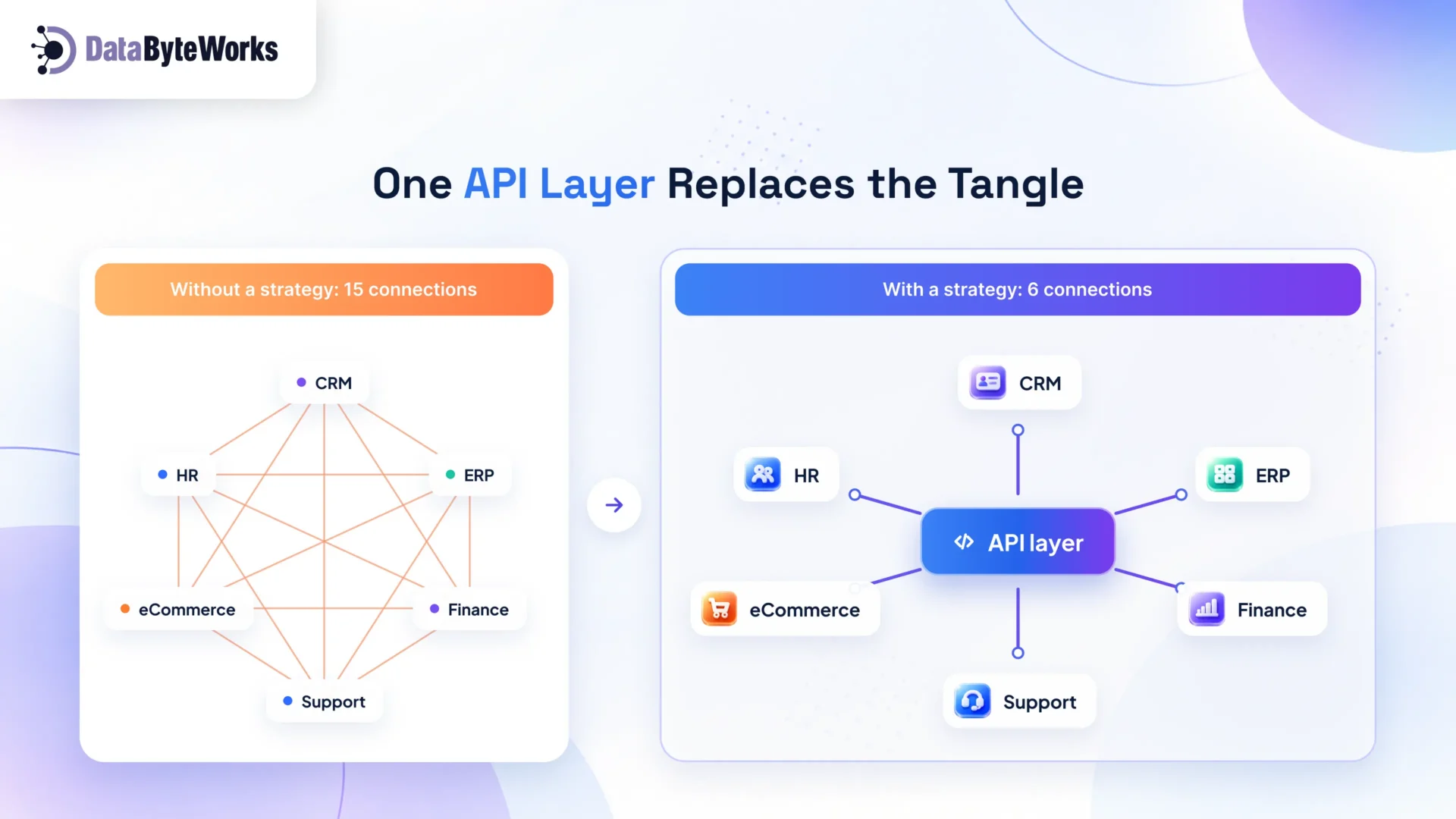
The first one is a Point-to-Point 15 links or connection model, whereas the other one is a Hub-and-Spoke 6 links or connection model.
In a hub-and-spoke model, each app connects once to a central hub, such as an iPaaS or API gateway. Adding a new app then means one new link, not a dozen.
Why Enterprise API Integration Matters More in 2026
Three findings from MuleSoft’s 2026 Connectivity Benchmark Report, a survey of 1,050 IT leaders, show the scale of the problem:
- 957 apps, only 27% connected. The average organization now runs 957 applications. Most of them still work in isolation.
- 36% of IT time goes to custom connections. IT teams spend more than a third of their time designing, building, and testing integrations. In a 20-person IT team, that equals about seven people working full-time on connections alone.
- 86% say AI needs integration first. Most IT leaders agree that without proper integration, AI agents add complexity rather than value.
AI tools can only act on the data they can reach. Strong enterprise API integration turns scattered data into a foundation that people and AI can both use.
5 Warning Signs You Have Integration Debt
Integration debt builds up one quick fix at a time. Two or more of these signs mean it’s time for a plan.
- Teams export data to spreadsheets just to share it with another team.
- A vendor update breaks something, and nobody knows who owns the fix.
- Adding a new tool takes months because every connection is custom.
- Leaders get different answers to the same question from different reports.
- Only one or two people understand how your key systems connect.
Where Does Your Business Stand? The 5-Level Integration Maturity Model
Before you plan the next step, find out where you are today. This model takes about a minute to use.
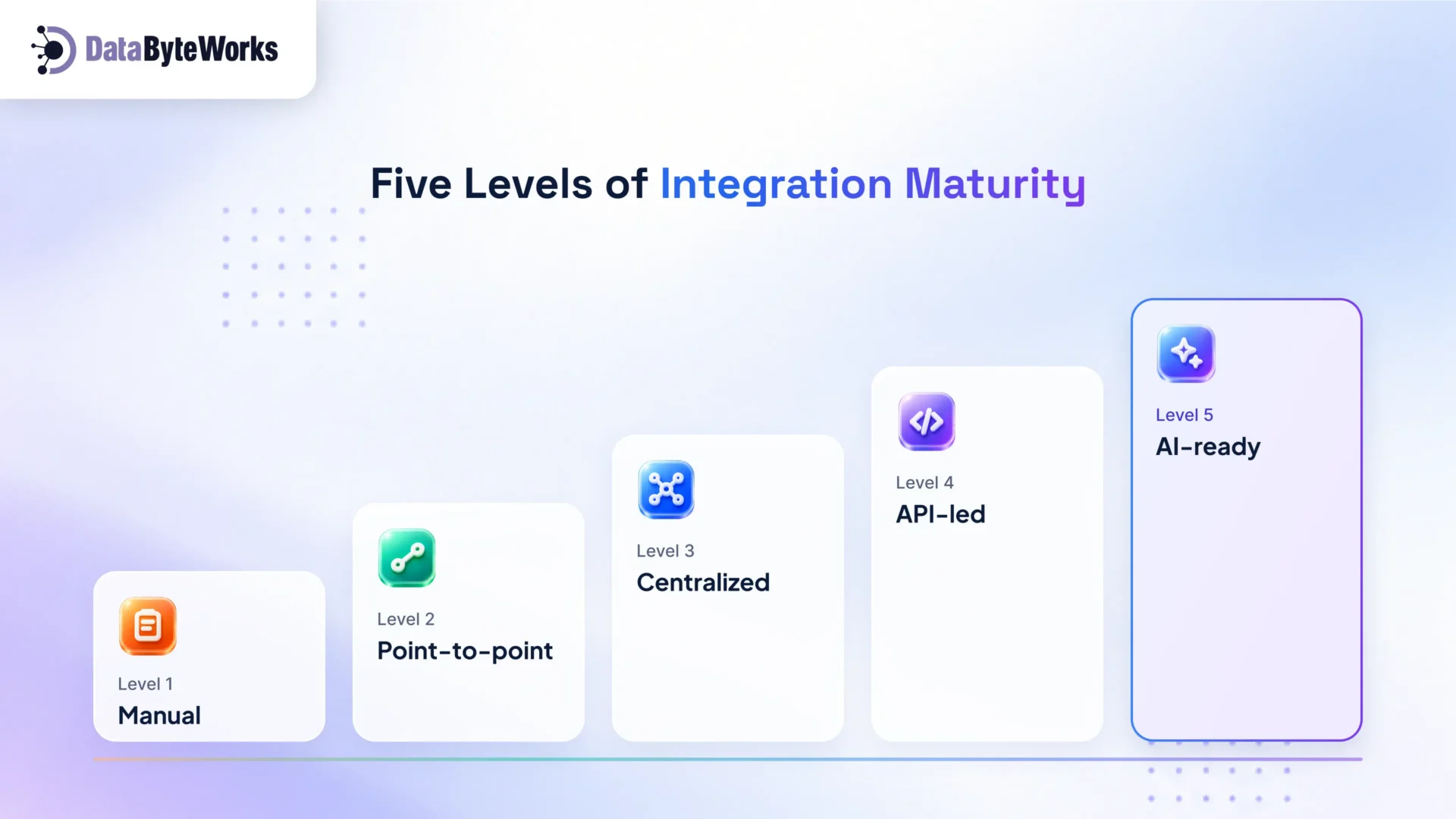
| Level | What it looks like | Your next move |
| 1. Manual | Teams copy data between spreadsheets and apps by hand | Automate your most repeated data entry first |
| 2. Point-to-point | Custom links connect pairs of apps, and each one breaks differently | Move your busiest links onto one shared platform |
| 3. Centralized | An iPaaS or API gateway runs most flows in one place | Turn common data, like customers and orders, into reusable APIs |
| 4. API-led | Teams share reusable APIs across products and regions | Add real-time events for time-sensitive flows |
| 5. AI-ready | Real-time, well-governed data serves both people and AI agents | Keep improving security, monitoring, and access rules |
Each level you climb cuts manual work.
Choose the Right Integration Pattern
No single pattern fits every need. The smartest teams pick a pattern for each business flow, then mix them as they grow.
| Pattern | Best for |
| Point-to-point | Two systems with simple, stable needs |
| iPaaS (integration platform as a service) | Connecting many SaaS tools quickly with a small team |
| API-led connectivity | Large companies that reuse the same data across teams |
| Event-driven architecture | Real-time updates such as stock levels, payments, and alerts |
| Hybrid | Most enterprises, which combine the patterns above |
iPaaS vs Custom Integration: Which Fits Your Business?
One of the biggest choices in any enterprise system integration plan is whether to buy a platform or build your own connections. Here’s how the two compare.
| Factor | iPaaS (cloud based integration platform) | Custom integration |
| Speed to launch | Fast, with ready-made connectors | Slower, because every link is built from scratch |
| Upfront cost | Low to medium | Medium to high |
| Ongoing cost | Subscription fees that grow with usage | Developer time for fixes and updates |
| Flexibility | Limited to what the platform supports | Full control over every detail |
| Maintenance | The vendor updates connectors for you | Your team owns every change |
| Best for | Many SaaS apps, standard workflows, small teams | Unique logic, legacy systems, very high volumes |
Most growing companies use both. They run standard flows on an iPaaS and build custom APIs only where they need full control.
Comparing Popular iPaaS Tools: MuleSoft vs Boomi vs Workato vs Zapier
| Tool | Best for | Key strengths | What to check first |
| MuleSoft (Salesforce) | Large enterprises running big API programs | API-led connectivity, full API lifecycle management, strong governance | It usually needs skilled developers and a larger budget |
| Boomi | Mid-size and large firms mixing cloud and on-premises systems | Low-code builder and a wide connector library; named a Leader in Gartner’s 2025 Magic Quadrant for iPaaS for the 11th time | Complex, high-volume flows may need expert setup |
| Workato | Business and IT teams automating workflows across SaaS apps | Easy “recipe” builder and strong automation and AI agent features; also a 2025 Gartner Leader | Confirm pricing for your expected task volume |
| Zapier | Small businesses and teams with simple app-to-app tasks | No-code setup and 9,000+ app connections | Limited enterprise controls, no on-premises option, and costs that rise at high volume |
This iPaaS comparison shows that the right tool depends on your systems, team skills, and growth plans. A short assessment helps you avoid paying for features you won’t use.
Legacy System Integration Without a Rip-and-Replace
Older systems often hold your most valuable data. Replacing them all at once is risky and costly. Smart legacy system integration lets you keep what works and modernize at your own pace.
| Option | What it means | Use it when | Effort |
| Wrap it | Place a modern API in front of the old system | The system is stable but hard to reach | Low |
| Sync it | Copy key data into a modern platform, on a schedule or in real time | Teams need the data for reporting or AI | Medium |
| Replace it step by step | Move one function at a time, such as billing, to a new system | The system is costly to run or no longer supported | High |
Build Your API Integration Strategy in 5 Steps
A strong API integration strategy doesn’t start with tools. It starts with your business.
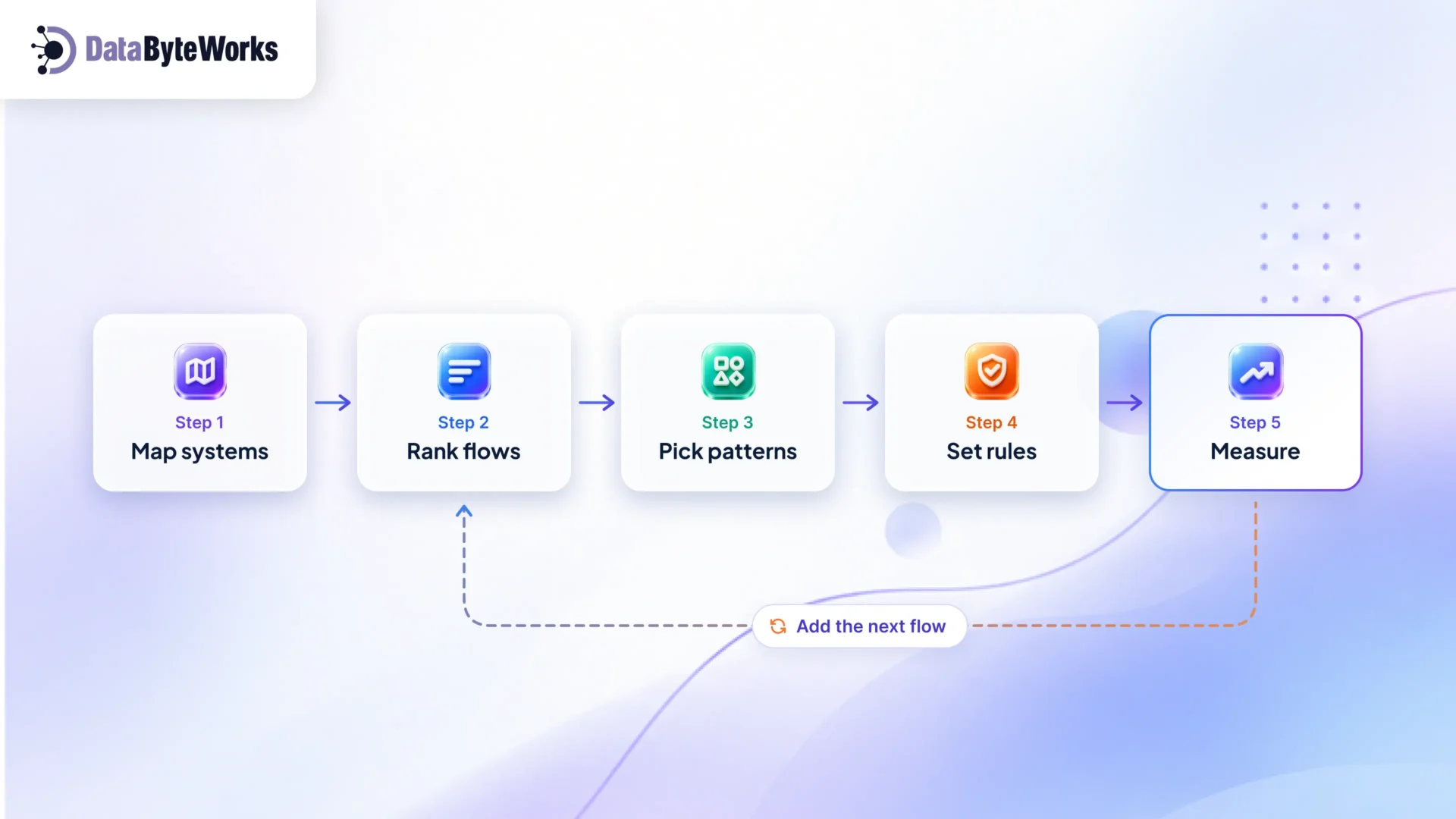
Step 1: Map Your Systems and Data Owners
Name the “source of truth” for each key record, such as customers, orders, and invoices. This prevents many data conflicts later.
Step 2: Rank Your Business Flows
Pick the three to five flows that affect revenue or customers most, such as order-to-cash. Fix these first for quick wins.
Step 3: Pick a Pattern for Each Flow
Match each flow to the simplest pattern in the table above that meets its needs.
Step 4: Set Rules for Security and Change
Decide who can access each API, how you version it, and who approves changes. Clear API governance keeps integrations stable as teams and vendors change.
Step 5: Measure, Then Expand
Track the KPIs below for each flow. Once a flow runs smoothly, add the next one.
7 API Integration Best Practices
These API integration best practices keep your connections fast, safe, and easy to grow.
- Treat APIs as products. Give every API a clear owner and simple documentation.
- Agree on one data model. Define what a “customer” or an “order” means once, so every system uses the same fields.
- Version everything. Release changes as new versions and warn users early.
- Secure every endpoint. Use strong authentication, limit access to what each app needs, and set rate limits.
- Plan for failure. Add retries, timeouts, and alerts, so a single outage doesn’t stop your whole business.
- Monitor business outcomes. Watch order sync rates and report delays, not just server uptime.
- Get ready for AI agents. Describe each API clearly, so AI tools use it correctly and safely.
Your API Integration Strategy Checklist
Use this quick API integration checklist to see if your plan is ready. Tick off what you already have, and the gaps will show you where to start.
Foundations
- We have a list of every system and API we run.
- Each key record, such as customers or orders, has one source of truth.
- Every integration has a named owner.
Design
- We picked a pattern for each critical business flow.
- We decided where an iPaaS fits and where custom APIs fit better.
- We have a plan for each legacy system: wrap, sync, or replace.
Security and governance
- Every API uses strong authentication and rate limits.
- We version our APIs and announce changes early.
- We retire unused APIs on a regular schedule.
- AI agents and MCP connections have tight permissions and full logs.
Operations
- Alerts tell us when a sync fails, before customers notice.
- We track business KPIs for each flow, not just uptime.
The Hidden Risk: API Sprawl and Blind Spots
Many companies lose track of their APIs. Shadow APIs are ones teams built without telling IT. Zombie APIs are old ones nobody switched off. Both give attackers an easy, unwatched way in.
Akamai’s 2026 API Security Impact Study, a survey of 1,840 security professionals, shows the scale:
- 87% of organizations had at least one API security incident in the past year, at an average cost of about USD 700,000.
- The median company runs more than 5,900 APIs.
- Only 23% know which of their APIs return sensitive data, down from 40% in 2022.
The fix starts with a live API inventory. Know what you run, who owns it, and what data it touches. Then retire anything nobody uses.
MCP: The New Way AI Agents Connect to Your Systems
AI agents need a safe, standard way to reach your data and tools. The Model Context Protocol (MCP) is fast becoming that standard. Anthropic released it as an open standard in late 2024, and major AI platforms now support it.
Think of MCP as a universal adapter. Your team connects a system once through an MCP server, and every approved Multi Agent AI system can use it.
There’s a catch. In the same Akamai study, 42% of organizations that had API incidents traced them to APIs linked to AI apps and agents. So treat every MCP server like any other API under a proper AI governance framework: give it an owner, tight permissions, and full logging.
Build In-House or Use API Integration Services?
The right answer depends on your skills, deadlines, and how complex your systems are.
| Option | Best when | Trade-off |
| In-house team | Integration is core to your product and you have skilled engineers | Slower to start, and it pulls engineers away from product work |
| Integration platform (iPaaS) | You need to connect many SaaS tools fast | Ongoing license costs and some vendor lock-in |
| Partner (system integration services) | You have legacy systems, tight deadlines, or a skills gap | Needs a clear handover so your team owns the result |
Most growing companies combine all three: a partner sets the foundation, a platform runs daily flows, and your team owns the strategy.
KPIs Leaders Should Track
| KPI | Why it matters |
| Share of apps connected | Shows how much of your data your teams can actually use |
| Time to launch a new integration | Reveals how fast you can respond to new business needs |
| Integration failure rate and time to fix | Protects revenue flows like orders and payments |
| Hours of manual data entry saved | Turns integration work into a clear productivity gain |
| Time to produce key reports | Shows how quickly leaders get reliable numbers |
Turn Disconnected Systems Into One Connected Business With API Integration Services
Without a clear plan, your teams lose hours to manual work, and your AI plans wait for data they can’t reach. You don’t need to fix everything at once. You need the right first steps.
DataByteWorks helps growing companies design and deliver an API integration strategy that fits their systems, budget, and goals. Our API integration services cover everything from legacy system integration to real-time, AI-ready data flows.
Book a free integration assessment. We’ll map your systems, find the three flows to fix first, and recommend the right pattern for each one.