

AI coding agents for enterprise teams can now take a task, write the code, run the tests, and open a pull request on their own. That’s a big step up from tools that only suggest the next line.
For CTOs, the question changes. It’s no longer “which tool should our developers use?” It’s “how do we use agents safely, at a predictable cost, without slowing delivery?”
The shift is happening fast. Gartner expects 75% of enterprise software engineers to use AI code assistants by 2028, up from less than 10% in early 2023. Trust is lagging: As per Stack Overflow 2025, via The Decoder, 46% of developers say they don’t trust the accuracy of AI-generated code.
This blog contains what has changed, what to check before you commit, and a simple 90-day plan. For the bigger picture, see our guide to Agentic AI in Enterprise Workflows.
From Code Completion to Autonomous Execution
Early AI tools finished your sentence. Today’s agents finish your task. That’s what agentic AI in software development means: the tool works toward a goal, not just the next line.
Inline suggestions vs. multi-file, multi-step agent work
The AI code assistant vs. AI coding agent difference is simple: who’s driving.
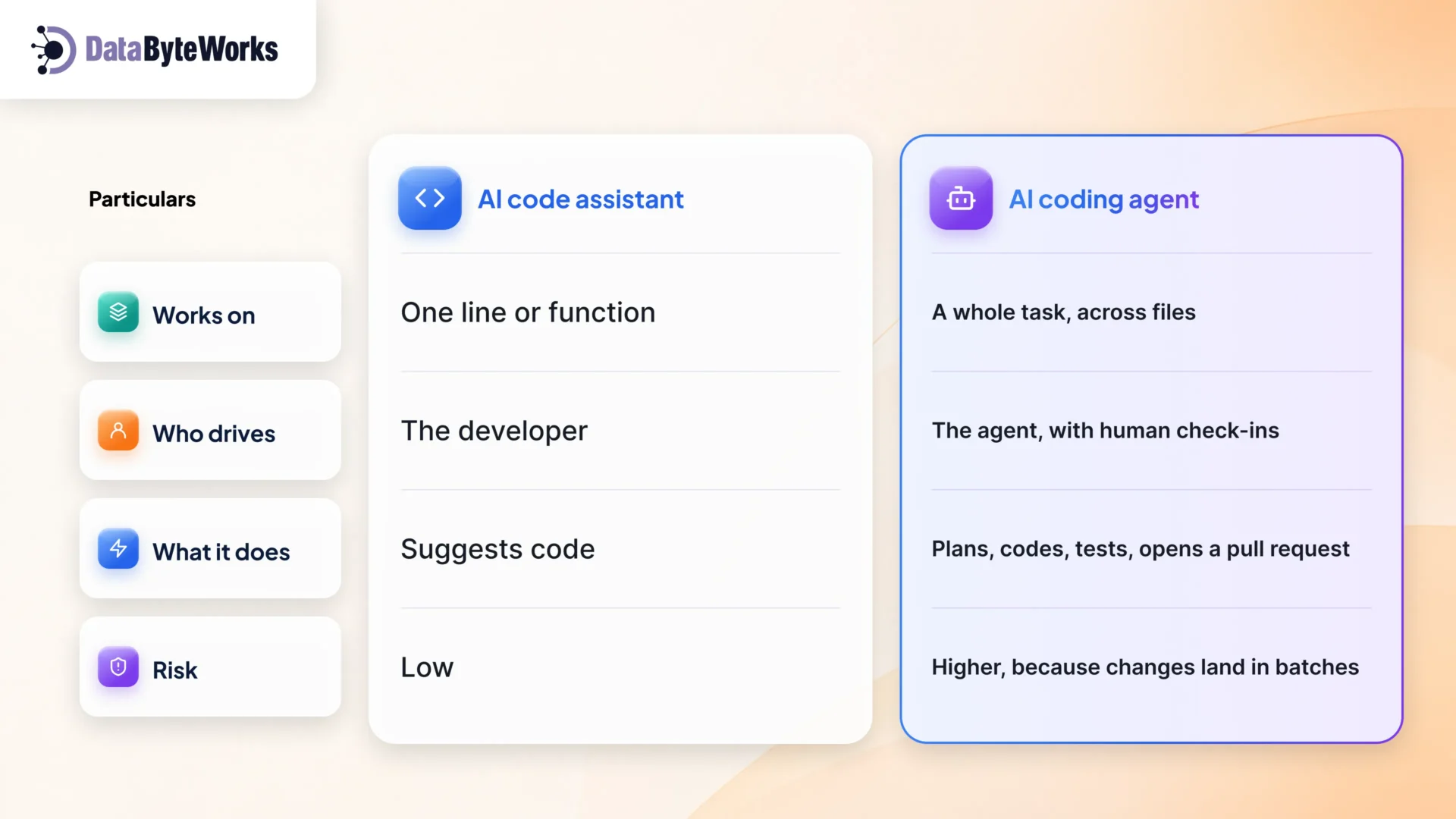
Gartner’s 2026 definition of enterprise coding agents says the same: they run multi-step tasks on their own, check their own work with tests, connect to build systems and log what they did.
Why this is a leadership decision now, not just a developer tooling choice
Autonomous coding agents affect four things only a CTO can own:
- Accountability: who answers for code no person typed?
- Risk: what can the agent see, change, and deploy?
- Spend: costs now grow with usage, not headcount.
- People: which skills will your team need next year?
Leave it to each team, and you end up with ten tools, ten rule sets, and no clear view of what reached production.
What Actually Changes Operationally for CTOs
Governance and audit trails for agent-written code
An agent can write the code, but a person still owns it. Set the rules before the first pull request, not after the first incident.
A good AI-generated code audit trail answers four questions for every change:
- Which ticket or task was it for?
- Which agent and model made it?
- What instructions did it get?
- Who approved the merge?
That’s one part of wider AI agent governance: who can use agents, on which code, and with how much freedom. Our guide to the AI Governance Framework for Business Leaders covers the full model.
Security review overhead and access control
If an agent can read all your code, it can leak it. If it can push code, it can push a vulnerability. So:
- Give agents access only to the repos they need. No production secrets.
- Run them in a sandbox, away from live systems.
- Scan every agent pull request for secrets, risky packages, and license issues.
- Get it in writing that the vendor won’t train on your code.
Make AI coding tool security and compliance part of the buying decision. These checks are far easier to settle before you sign a contract than after an incident.
Cost model shift — seat price vs. token spend vs. the “review tax”
When teams estimate the cost of enterprise AI coding tools, they usually count only the license. In reality, the cost comes in three layers, and only the first shows up on the invoice.
| Cost | What drives it | Who usually tracks it |
| Seats | Number of users | Procurement |
| Usage (tokens) | How much work agents do | Often nobody |
| Review tax | Senior engineers checking agent output | Nobody, until delivery slows |
The review tax matters most. Two in three developers say AI output is often “almost right, but not quite,” so someone has to check it carefully. Count that time as a real cost from day one.
Team structure — reviewer and orchestration skills over raw coding output
When agents write first drafts, the most valuable skills change:
- Reviewing: catching the line that looks right but fails at scale.
- Specifying: writing tasks clear enough for an agent to do well.
- Orchestrating: splitting work between agents and people. AI agent orchestration becomes an everyday team skill.
At DataByteWorks, agents draft code and tests, and a person reviews every pull request before it ships. AI code review automation catches common issues early, but it supports the reviewer. It doesn’t replace them.
From our work: On legacy .NET modernization projects, we use AI agents for the repetitive parts of a migration: updating packages, rewriting deprecated APIs and drafting unit tests for code that has none. The agent produces a first pass quickly, but our reviewers check every change against how the old system actually behaved, not just whether the new code compiles. That review step matters most in older systems, where business rules often live in the code and nowhere else. AI speeds up the first draft. Our engineers stay accountable for what ships.
Evaluating Coding Agents Before Committing to One
Demos show speed. Production needs control. When you compare AI coding agents for enterprise use, test them on your own code and ask four questions.
Core dimensions — determinism, auditability, context persistence, reversibility
| Check | Ask this |
| Determinism | Does the same task give the same quality of result each time? |
| Auditability | Can we see every file it changed and every command it ran? |
| Context persistence | Does it remember our conventions from one task to the next? |
| Reversibility | Can we undo any agent change cleanly? |
Where off-the-shelf agents break down in regulated or complex environments
Generic agents do best on modern, well-tested code. They struggle with:
- Old systems with few tests and undocumented rules.
- Regulated data, like payments or health records.
- On-premises setups that can’t call a public AI model.
- In-house frameworks the model has never seen.
These gaps often show up during enterprise software modernization, when the code is oldest, and the risk is highest. When an off-the-shelf agent can’t meet those requirements, most enterprises extend it through custom software development services built around their existing code and compliance rules.
Building AI Agent Capability Beyond Coding Tools
Coding agents as one entry point into broader agent adoption
For many companies, coding agents are the first agents that touch real systems. The lessons carry over to every agent that follows: limited access, full logs, human approval, and a clear owner. They matter even more when agents work together, as we explain in Multi-Agent AI Systems Explained. In multi-agent AI systems, several specialized agents share one workflow.
What it takes to build and maintain custom agents internally
Custom AI agent development takes more than connecting to a model. You’ll need:
- Access controls for every system the agent touches.
- Test sets that catch quality drops when anything changes.
- Monitoring for cost, speed, and failures.
- An owner who keeps the agent up to date.
Coding agents are often where an agent strategy starts. The next step for most enterprises is AI agent development built for their specific workflows, not just their code.
Integrating Coding Agents into Existing Enterprise Systems
CI/CD pipeline touchpoints
Good CI/CD pipeline integration treats agent changes like any other change. No shortcuts:
- Every agent pull request runs the full tests and security scans.
- Agents can’t merge their own work.
- Agent commits are tagged so that you can report on them later.
Connecting agents to internal codebases, ticketing, and documentation
Agents do better work with better context: the ticket, the related code, and the team’s docs. Once they’re connected, an agent can pick up a ticket, do the work, and link its pull request back on its own. This is where software development lifecycle (SDLC) automation starts to save real time, because fewer handoffs depend on someone copying updates by hand.
This is also where most pilots stall. Making agents work inside existing pipelines, ticketing tools, and docs is usually handled through dedicated AI integration services, not one-off scripts built in-house.
Rollout Framework — Pilot to Scale
The safest way to roll out AI coding agents for enterprise teams is in small steps, with one clear checkpoint in between.
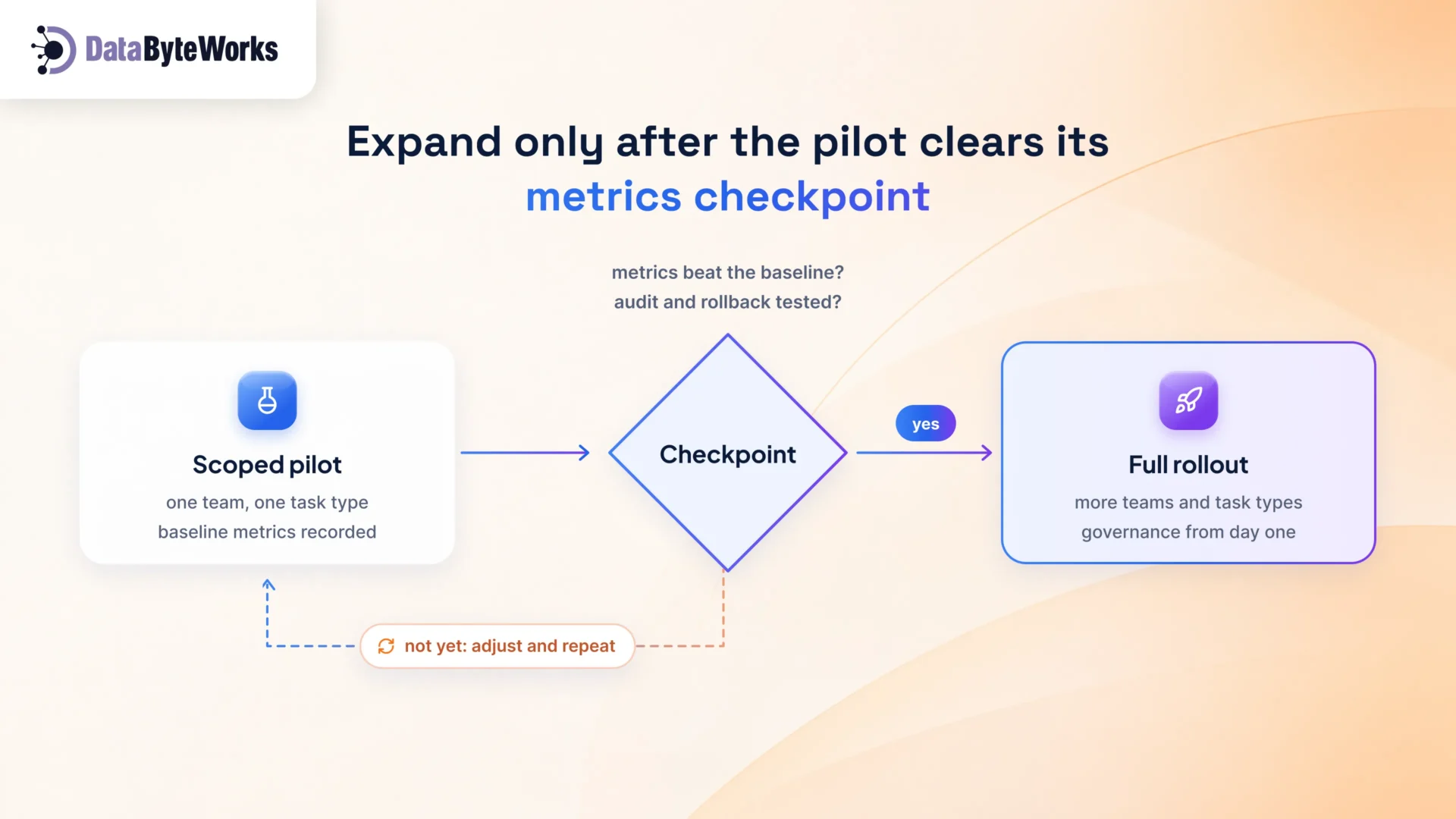
Scoped pilot team selection
Pick one team with good test coverage and a willing lead. Give the agent one type of task, such as writing unit tests or fixing low-risk bugs. Write down today’s numbers first, so you have something to compare against.
Metrics checkpoint before expanding
At the end of the pilot, compare against those numbers. Expand only if three things are true: results improved, review time is manageable, and you’ve tested an audit lookup and a rollback at least once.
Full rollout with governance built in from day one
Add teams and task types step by step. Each new team gets the same access rules, audit trail, and review standards from day one. No quick start now and cleanup later.
Metrics CTOs Should Actually Track
Pick a few metrics and track them from the start. “Lines of code generated” isn’t one of them.
Cycle time, defect rate, deployment velocity
| Metric | What it shows | Watch out for |
| Cycle time | Time from ticket to production | Faster coding, slower reviews |
| Defect rate | Bugs that reach production | More bugs in agent-written code |
| Deployment velocity | How often you ship safely | More merges, but more rollbacks |
| Review time | Hours spent checking agent work | A review load that keeps growing |
Agent utilization and governance compliance
Track how much work each team gives to agents, and how much of it followed the rules: approved repos, human sign-off, logged instructions. Like other developer productivity tools, agents only pay off when people use them, and use them the agreed way.
Where Enterprises Get This Wrong
Treating it as a tool purchase, not a process redesign
Buying seats is easy. Changing how work is planned, reviewed, and approved is the real project. Skip that, and you get faster code but slower delivery.
No rollback or audit plan until an incident forces one
Don’t wait for an outage to learn how to trace an agent’s change. Test it during the pilot, while the stakes are low.
Next 90 Days — A Concrete Checklist
- Run a scoped pilot with one team and one defined task type
- Define audit and rollback requirements before any agent touches production code
- Set a cost-tracking baseline (seat spend + token spend) before adding more seats
- Pick 2–3 metrics (cycle time, defect rate, review time) to track from day one
- Assign an owner for agent governance policy, separate from whoever owns tool procurement
Planning Your Agent Rollout?
Most shortlists of AI coding tools for CTOs focus on features. The better question is fit: your code, your compliance rules, and your team. We help enterprises pilot, connect, and govern coding agents, and build custom agents where off-the-shelf tools fall short.
Talk to our AI agent development team