

Introduction
Every enterprise relies on an application that quietly runs payroll, claims, or customer orders. Earlier, most were built on .NET Framework. They still work, but every year it costs more to host, takes longer to change, and gets harder to staff. Hence, a well-planned .NET Framework to .NET migration turns that liability back into an asset.
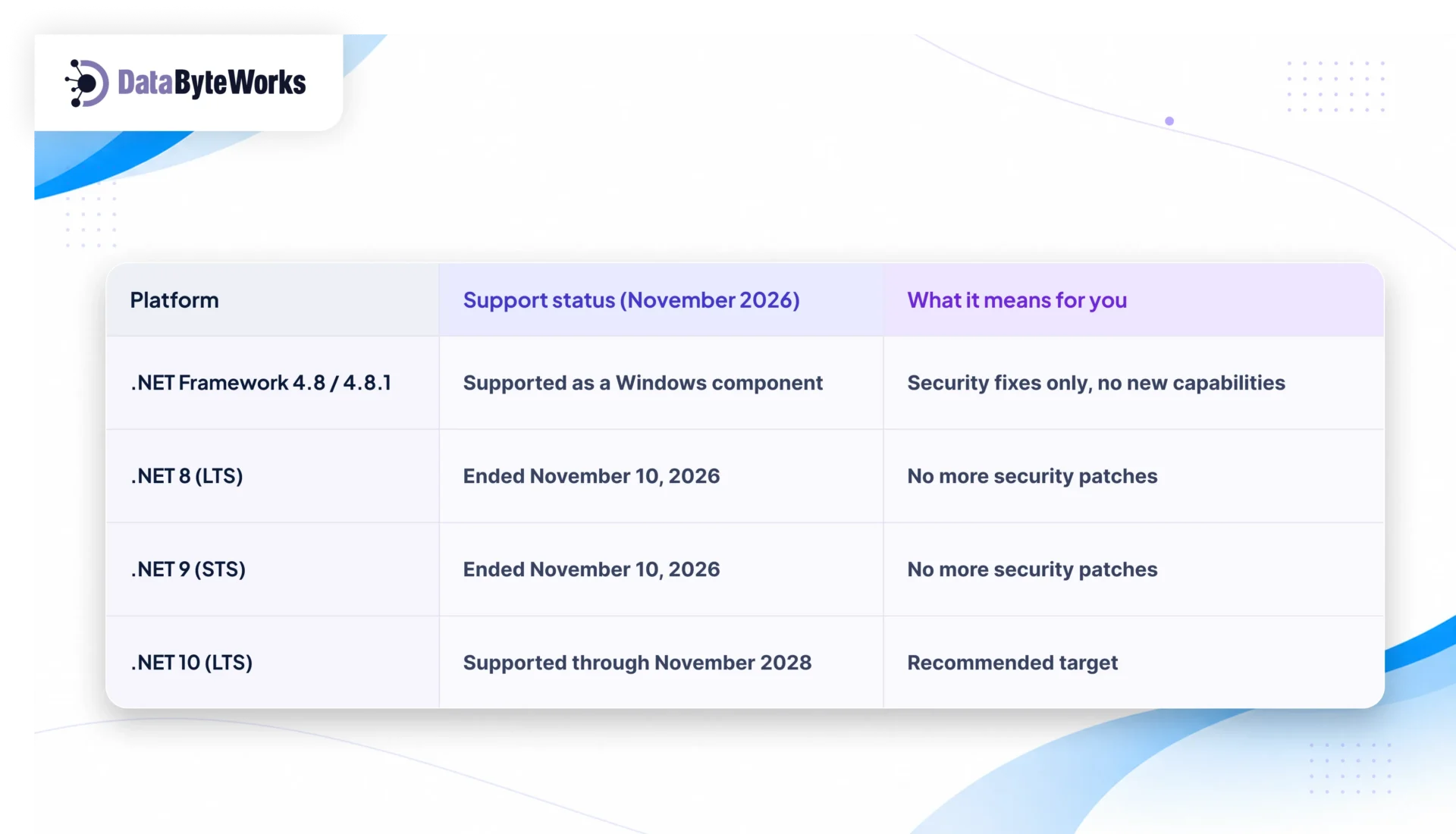
On November 10, 2026, Microsoft ended support for .NET 8 and .NET 9. Teams that migrated to .NET 8 are already facing another upgrade. The right target now is .NET 10, the long-term support (LTS) release supported through November 2028.
.NET Framework 4.8 isn’t going away. It still gets security fixes through Windows, but it’s frozen. Every new capability ships only in modern .NET.
This guide gives you a 10-step checklist your team can follow, with an exit criterion for every phase. It works whether you migrate in-house or with a legacy modernization services partner.
Why Migrate Now? The Business Case for US Companies
 Security and Compliance. PCI DSS, HIPAA, and SOC 2 all expect timely patching and a supported technology stack. Auditors are paying more attention to runtimes that are out of support or close to it. For companies in financial services, healthcare and government, a modern, supported platform is part of how you pass audits. Modern .NET also comes with stronger cryptography defaults, built-in rate limiting, and better identity integration.
Cloud and Hosting Costs. Modern .NET runs on Linux and in containers. For many workloads that removes the need for Windows Server licenses and lets you run more services on each host. Each release also brings runtime performance improvements, so the same infrastructure handles more traffic. For teams moving to AWS, Azure, or Google Cloud, these savings compound month after month.
Speed of Delivery. Modern .NET fits well with today’s DevOps practices. These include fast command-line builds, container images built into the SDK, and first-class support for CI/CD pipelines. Teams usually ship smaller changes more often, and with more confidence.
Hiring and Retention. Most developers learning .NET today learn ASP.NET Core. Engineers with Web Forms and WCF experience are getting scarcer and more expensive, and fewer want those roles. Moving to modern .NET makes your open positions more attractive and helps you keep the engineers you already have.
The Cost of Waiting. None of these pressures is going away. Every new feature built on the Framework is one more thing to migrate later. If your team is already at capacity, our .NET development services team can provide the extra people the migration needs.
Pick Your Target and Strategy First
Target .NET 10 LTS. .NET 11 also launched on November 10, 2026, but it’s a standard-term release. For production enterprise systems, LTS gives you the longest, most predictable support window. It also gives your team a stable base for the next upgrade.
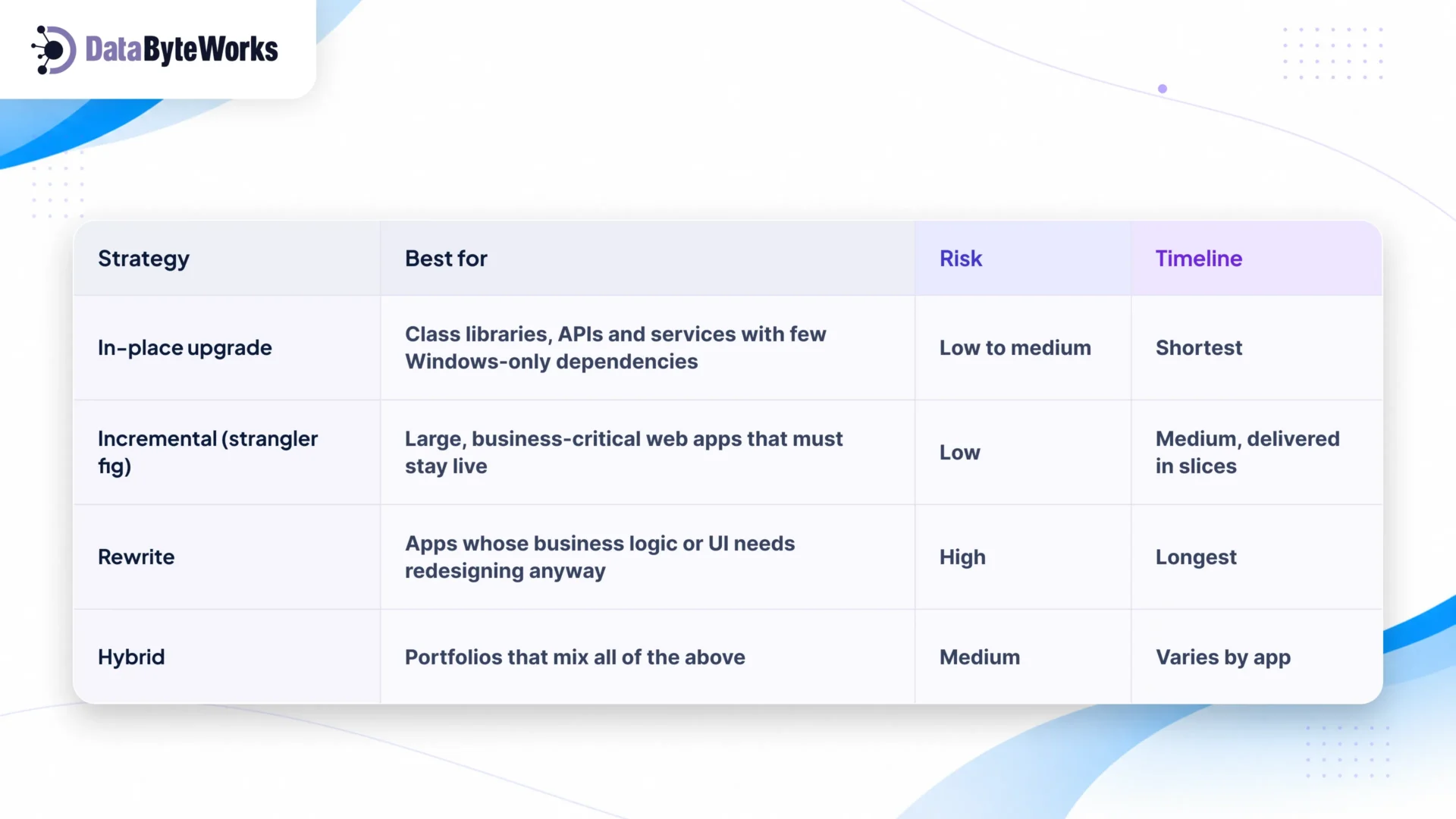
Next, decide how you’ll get there. There’s no single right answer. The best strategy depends on the size of the app, how critical it is, and how much of the old architecture is worth keeping.
Quick Decision Guide:
- Small, well-tested app with no Web Forms or WCF? Upgrade in place.
- Large web app that can’t go offline? Go incremental, moving one route or feature at a time.
- Heavy Web Forms UI that users already dislike? Rewrite the UI and keep the business logic.
- A portfolio of dozens of apps? Go hybrid, choosing a strategy app by app based on the assessment.
The .NET Framework to .NET Migration Checklist
This is the core of our playbook. We work through the phases in order. So, you don’t start a phase until the one before it has met its exit criterion.
1. Inventory every application
You can’t plan what you can’t see. Most organizations find apps, jobs, or libraries during this step that nobody had listed.
- List all web apps, APIs, Windows services, scheduled jobs, and shared libraries
- Record the owner, hosting environment, and criticality of each business
- Note the current Framework version and deployment method
- Map which apps share libraries or databases
Exit criterion: A single, signed-off inventory with no unknown owners.
2. Run a readiness assessment
The assessment turns the inventory into a plan. Automated tools do much of the heavy lifting, but people still need to judge business risk.
- Run the .NET Upgrade Assistant or GitHub Copilot app modernization on each solution
- Flag blocking APIs and unsupported project types
- Score each app on complexity and business risk
- Choose a strategy for each app (see the table above)
Exit criterion: A risk-ranked migration backlog approved by leadership.
3. Audit dependencies
Third-party code is where most surprise delays come from. Find them now, while they’re cheap to fix.
- Check every NuGet package for a version that supports .NET 10
- Identify COM components, third-party SDKs, and Windows-only APIs
- Choose a replacement, wrapper, or exception for each blocker
- Confirm licensing and vendor support for any new packages
Exit criterion: Every dependency has a documented path forward.
4. Prepare the codebase
These changes are low-risk and can ship to production on the old Framework. That way, the real migration starts from a clean base.
- Retarget projects to .NET Framework 4.7.2 or later
- Convert to SDK-style project files
- Move from packages.config to PackageReference
- Extract business logic into .NET Standard 2.0 libraries
Exit criterion: The solution builds and runs cleanly on .NET Framework using the new project format.
5. Build a test baseline
Tests prove nothing broke. Without them, every release after the migration is a gamble.
- Get all existing unit tests passing
- Add integration tests for critical business flows
- Record performance benchmarks (response times, throughput, memory)
- Automate the suite in your build pipeline
Exit criterion: A repeatable, automated test suite and benchmark you can compare the migrated app against.
6. Resolve the blockers
Some technologies don’t exist in modern .NET. Each one needs a deliberate replacement, proven before you commit to it.
| Legacy technology | Modern option |
| ASP.NET Web Forms | Blazor, Razor Pages or MVC |
| WCF | CoreWCF, gRPC or Web API |
| System.Web | ASP.NET Core equivalents |
| Entity Framework 6 | EF Core |
| AppDomains and Remoting | Separate processes or containers |
| BinaryFormatter | System.Text.Json |
Exit criterion: Every blocking technology has a working replacement, proven by a prototype.
7. Migrate bottom-up
Start with the code that has no dependencies of its own. Every layer you finish makes the next one easier.
- Migrate shared libraries first
- Then services and APIs
- Then the user interface
- For large apps, run old and new side by side using a YARP proxy and System.Web adapters
Exit criterion: Every migrated component compiles on .NET 10 and passes its baseline tests.
8. Modernize configuration and security
Migration is the best chance in years to remove security debt. Don’t carry old habits into a new platform.
- Move web.config settings to appsettings.json
- Move secrets to a vault such as Azure Key Vault
- Replace legacy authentication with modern identity (OpenID Connect, Microsoft Entra ID)
- Enforce TLS and review CORS policies
Exit criterion: No secrets in source control and a clean security review.
9. Validate
This is where the test baseline from step 5 pays off. You’re proving the new app matches the old one, and does better where it counts.
- Confirm functional parity with the original app
- Run load tests against the baseline
- Run security scans (SAST and dependency scanning)
- Profile memory and startup time
Exit criterion: Results equal or better than the baseline, and the business owner has signed off.
10. Deploy and cut over
A calm go-live is a well-rehearsed one. Have a rollback plan even if you never need it.
- Set up CI/CD pipelines and container images
- Roll out using staging, canary, or blue-green deployments
- Rehearse the rollback plan
- Configure monitoring, logging, and alerts
Exit criterion: Production traffic runs fully on .NET 10, and the legacy app is decommissioned.
6 Common Migration Mistakes (and Fixes)
- Targeting .NET 8. It’s already out of support, so you’d be signing up for a second migration.
Fix: go straight to .NET 10. - Big-bang rewrites. They run over time and over budget, and they deliver nothing until the very end.
Fix: migrate incrementally and deliver value in slices. - Skipping the test baseline. Without one, you can’t prove the new app works the same as the old one. Every bug report becomes a debate.
Fix: complete step 5 before you change any code. - Sync-over-async deadlocks. Calls like .Result and .Wait() that seemed harmless in the old app can cause failures under load in ASP.NET Core.
Fix: make code async all the way through. - EF Core queries that no longer translate. Some EF6 LINQ queries fail or behave differently in EF Core.
Fix: test every query path against realistic data and check the generated SQL. - Underestimating third-party libraries. Binding-redirect errors, abandoned packages, and vendor SDKs that only run on Windows are a common cause of delays.
Fix: finish the dependency audit before you commit to a timeline.
How Long Does It Take and What Does It Cost?
Every portfolio is different, but four factors drive most of our efforts in this direction:
- Project count. More projects mean more builds, tests, and deployments to update.
- Web Forms and WCF usage. These need redesign rather than conversion, so they take the most time.
- Test coverage. Low coverage means building a safety net before any migration starts.
- Third-party dependencies. Each unsupported package needs research, a replacement, and testing.
| Size | Typical profile | Indicative timeline |
| Small | 1–5 projects, APIs or MVC, good tests | [X–Y weeks] |
| Medium | 5–20 projects, some WCF or Web Forms | [X–Y months] |
| Large | 20+ projects, heavy Web Forms, low test coverage | [X–Y months, phased] |
Cost follows timeline and team size. That’s why an assessment up front is the best investment in the whole project. It replaces guesswork with a backlog you can estimate. Our .NET migration services start with exactly that, so your budget is based on evidence.
Build In-House or Hire .NET Migration Services?
In-house work when your team already knows modern ASP.NET Core, has time set aside for the project, and the portfolio is small and well tested.
A partner is the safer choice when deadlines are tight, Web Forms or WCF are central to your apps, compliance is on the line, or your senior engineers can’t be pulled away from the product roadmap. An experienced partner has solved your blockers before and knows where the hidden risks are.
If you choose a partner, look for one who:
- Starts with an assessment, not a fixed quote
- Delivers in phases with clear milestones
- Tests for functional parity at every stage
- Transfers knowledge to your team before handover
At DataByteWorks, we provide legacy modernization services, .NET development services, and Custom .NET Application Development for US mid-market and enterprise teams. We assess your portfolio, migrate it in safe, measurable phases, and hand back a modern platform your engineers can confidently own. Explore our .NET services.
Case Study: Fraud Detection Platform
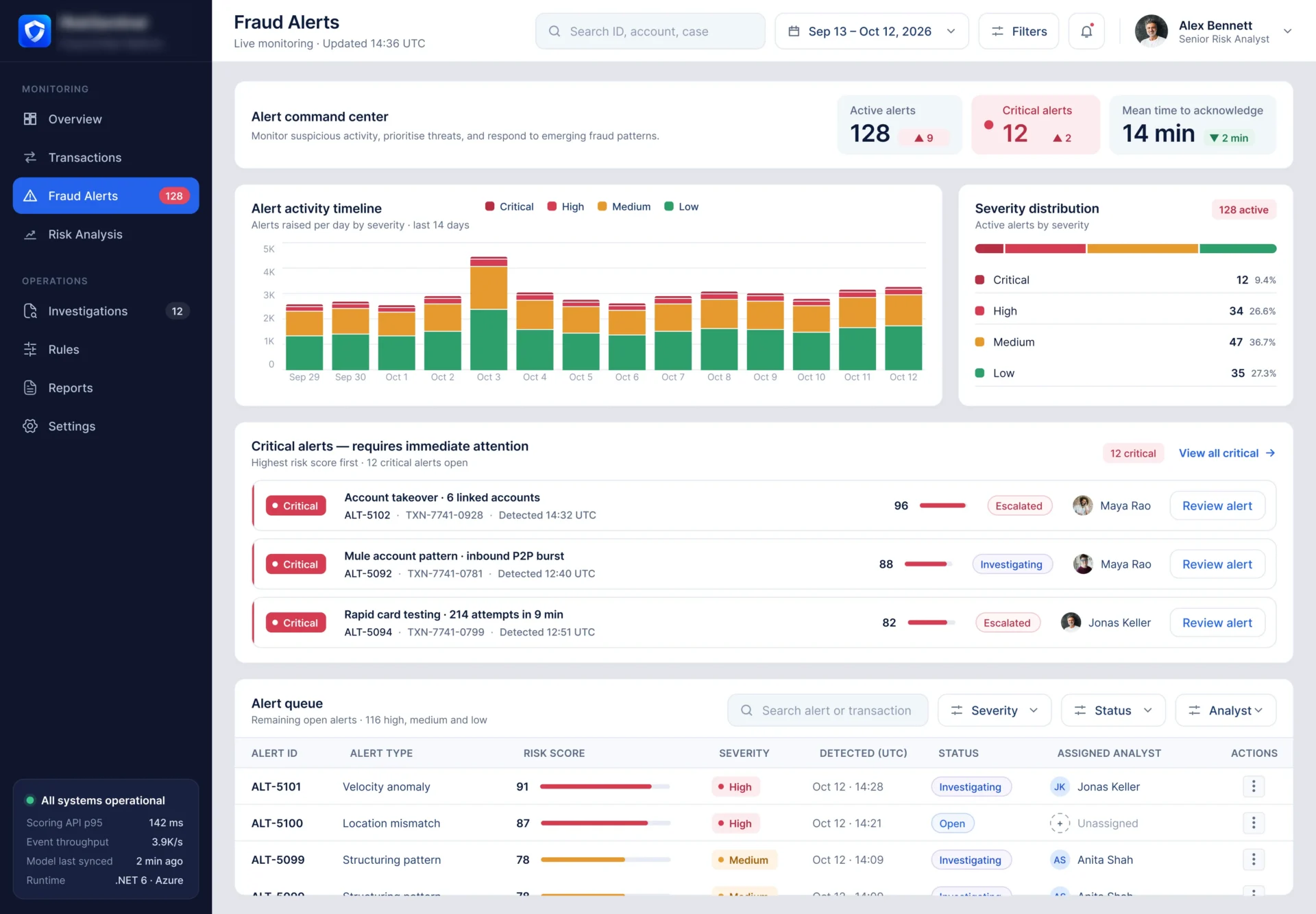
Challenge: A US fintech services client’s fraud detection engine ran on .NET Framework with WCF services and on-premises servers. It struggled to score transactions in real time at peak volumes.
Approach: DataByteWorks migrated the platform step by step to .NET 10 using the strangler fig pattern. We rebuilt the WCF services as gRPC / Web APIs and moved the scoring engine into [Azure / AWS] containers, with no downtime.
Result: Transaction scoring became faster, hosting costs were reduced, and releases progressed excellently.