

When deciding how to get a white-label app for your business, you have two options: either you buy an existing app or build a custom one. In enterprise mobile app development, buy when the workflow is standard, and the user base is small. Build when your app faces customers, sets you apart, or has to plug deeply into your own systems.
Most guides rarely share that mobile apps have extra challenges that websites and desktop software may not have. For example, app store approval, device differences, and offline access. Those can push the answer either way.
The guide also explains which development approach to choose if you build a native or cross-platform app, and who should develop it: your in-house team, a dedicated development team, or an external mobile app development company.
Why Mobile Build-vs-Buy Isn’t the Same Question as Software Build-vs-Buy
Mobile apps have four extra challenges: app store approval, different devices, offline access, and company security policies.
Apple and Google may need to review an app before releasing it or updating it. If you build the app, your team manages this process. If you buy one, the vendor manages it, but you may have to wait for the vendor to release a fix.
Apple rejected about 2.09 million submissions after reviewing them in under 24 hours, nearly one in four. Google Play publishes no target and says some accounts can wait seven days or more. If you build, you own that release cycle. If you buy, the vendor owns it, including when a fix you need actually reaches your users.
In case of different devices, your app must work on different phones, screen sizes, and operating system versions. When buying, you depend on the vendor to test and maintain compatibility. A built app needs a testing plan for that spread. A bought app depends on the vendor having one.
Employees working in hospitals, warehouses, or remote areas may need to use the app without internet. Building reliable offline access and syncing data later can be difficult. Hence, offline access comes into play.
Also, if employees use their personal phones for work (BYOD), the app must work with the company’s security and device-management policies. Check this compatibility before buying an app. A custom app has to be built with it in mind.
In short: These mobile-specific challenges can affect the cost, maintenance, security, and reliability of your app.
When should you buy an existing app?
Buying an app makes sense when your business needs are common and don’t require anything unique.
For example:
- When you have standard tasks such as expense approvals, timesheets, inspection forms, and employee directories.
- When you have a small user base of only 50 employees who use the app and buying a subscription may be cheaper than building a custom app.
- If you need an app within a few weeks, an existing product may be faster than developing one from scratch.
Before buying, check three things:
- Offline support: Does the app work without an internet connection?
- Security compatibility: Does it meet your company’s security requirements?
- Data export and integrations: Can you transfer your data or connect the app to other systems if you switch products later?
When should you build a custom app?
Building makes sense when your app needs to do something special for your business or gives you a competitive advantage.
For example:
- If customers use your app to book services, place orders, manage accounts, or access healthcare services, a custom app lets you create an experience that matches your business.
- If the app needs to connect closely with your CRM, ERP, hospital management system, or other internal software, a custom solution can be designed around those systems.
- If subscription fees increase significantly as more employees use the app, building your own may become more economical over time.
A custom app usually costs more initially and requires ongoing maintenance. That’s why businesses should compare the total cost of both options over 3–5 years, rather than looking only at the initial price.
Compare the two over 3–5 years:
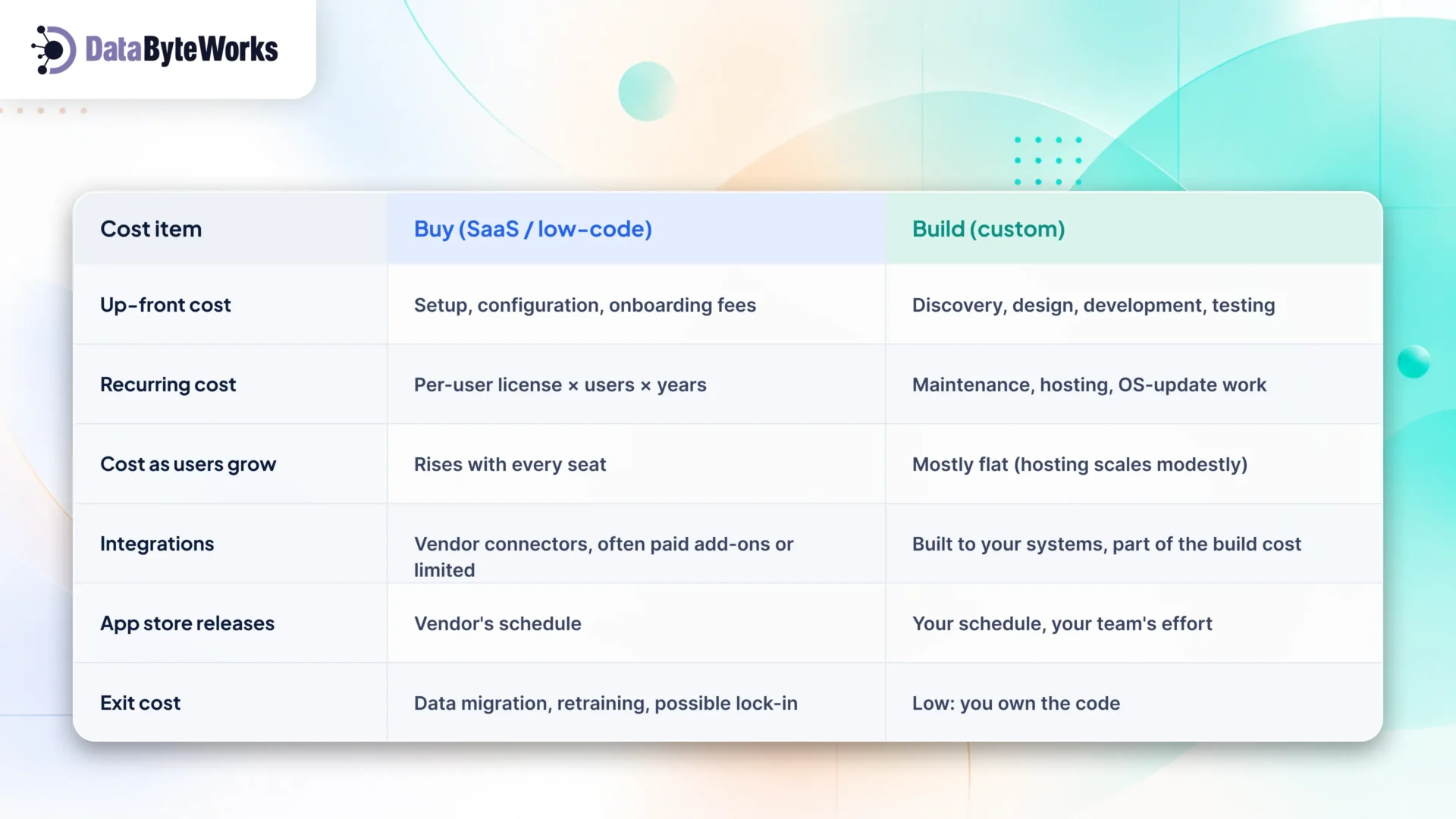
A simple break-even check
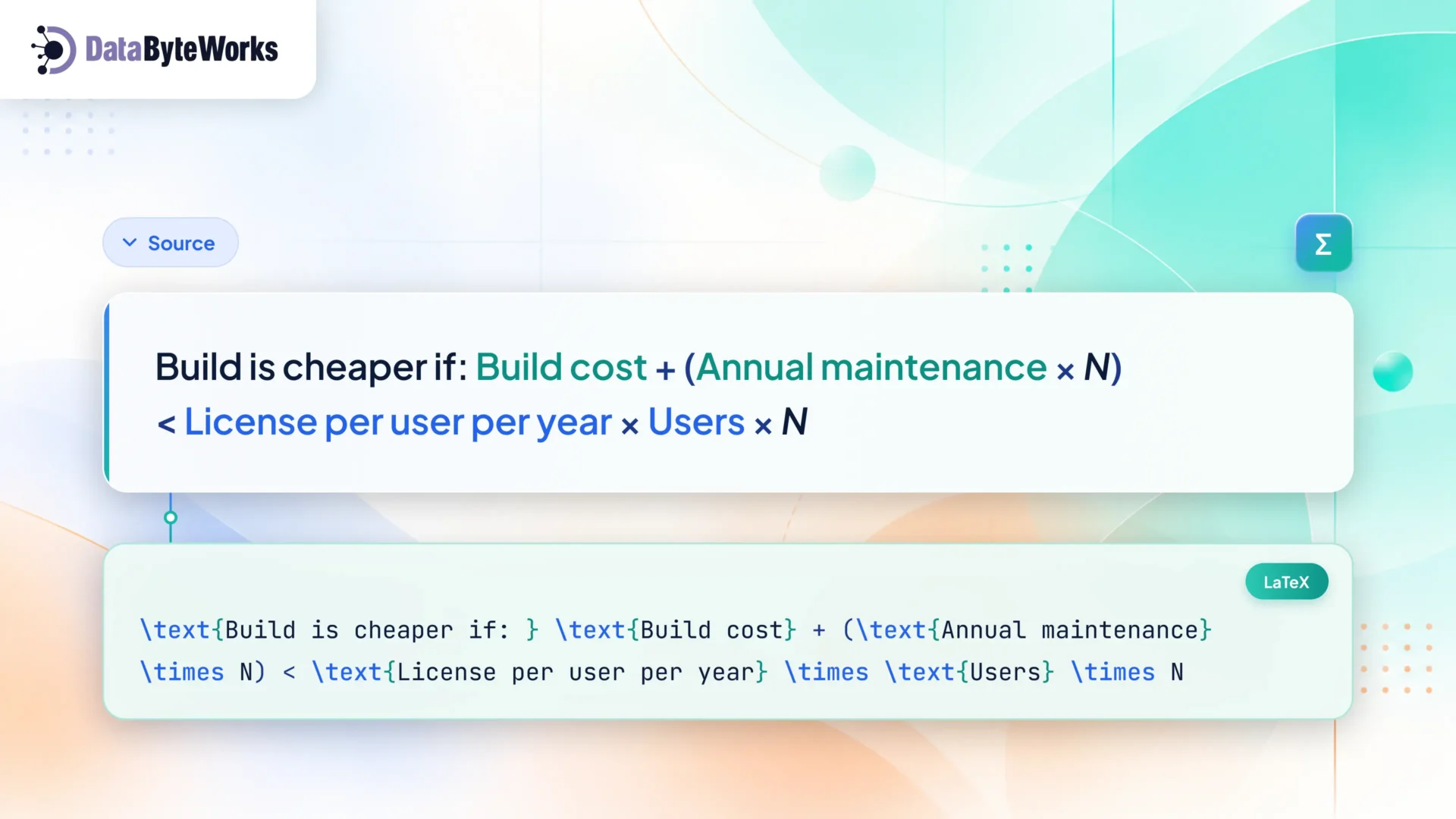
Here N is the number of years you expect to run the app. Budget annual maintenance at 15–25% of the original build cost, covering OS updates, security patches, and small improvements.
Illustrative example. 1,000 field users on a platform charging $30 per user per month cost $360,000 a year, or $1.08 million over three years. A mid-complexity custom app at 150,000, plus 20% a year for maintenance (30,000), costs $240,000 over the same three years. At 50 users, the SaaS bill drops to $54,000 over three years, and buying wins easily. (The license price here is an example. You can put your vendor’s quote.)
Native vs. Cross-Platform: The Build Decision Within the Build Decision
Once you decide to build, hiring a custom mobile app development company the next choice is how. For most enterprise apps, cross-platform is the better default option. Native earns its extra cost only when the app pushes hard on device hardware or performance.
| Factor | Cross-platform (React Native, Flutter) | Native (Swift for iOS, Kotlin for Android) |
| Codebase | One shared codebase for iOS and Android | Two separate codebases |
| Team | One team | Two teams or two skill sets |
| Time to launch on both platforms | Shorter | Longer |
| Performance | Good for forms, lists, dashboards and most business apps | Best for heavy graphics, real-time processing, AR |
| Device and OS features | Most available; some need native modules | Full access from day one of each OS release |
| Long-term maintenance | One app to update | Two apps to keep in step |
Choose cross-platform for field apps, internal tools, customer portals, ordering and booking apps. These are the most common enterprise mobile app development use cases. React Native is a common choice when your web team already works in React, because skills and some logic carry over. If you go this route, you can hire React Native developers to start without building a team from scratch.
Choose native when the app depends on advanced camera work, Bluetooth peripherals, or heavy offline data processing, or must adopt new iOS or Android features the day they ship. For iOS-first products, dedicated iOS developers are the usual route. Android-heavy fleets, such as rugged devices in warehouses, need the Kotlin equivalent.
If the app needs AI features such as document scanning, on-device classification, or a chat assistant, the decision changes again. Off-the-shelf tools rarely let you choose or tune the model. See our AI app development services for how we approach that.
Kelton (same source as above) suggests that the cost difference is real. React Native and Flutter projects typically deliver 30–40% faster than building two native apps, and most enterprise app development clients in 2026 now launch on both platforms from day one using a cross-platform framework.
Who Should Build It: In-House, Dedicated Team or Agency?
The right builder depends on how long the app will need active development and how much mobile skill you already have.
| Option | Best when | Watch out for |
| In-house team | Mobile is core to the business for years; you can hire and keep iOS, Android, or React Native engineers | Hiring takes months; a two-person team becomes a single point of failure |
| Dedicated external team | You need mobile skills now, want control of the roadmap, and expect ongoing development | Needs a product owner on your side to set priorities |
| Project-based agency | Fixed scope, a clear end date, little work expected after launch | Knowledge leaves when the contract ends; change requests cost extra |
For most mid-size companies, a dedicated team is the middle path. You get experienced mobile developers working only on your app, under your direction, without the hiring delay. You can grow or shrink the team as the roadmap changes, and hand over to in-house staff later if you build that capability.
What does this look like in practice?
A US revenue-protection services company that serves logistics and transportation firms hired DataByteWorks to design, build, and support a secure, cloud-based enterprise platform for large-scale data ingestion, analysis, and reporting.
The team built the work on Microsoft MVC, SQL Server, and Azure, and the engagement ran as a long-term partnership rather than a one-off project. In the client’s published review, they credit the platform with greater stability, consistent performance and faster issue resolution, and say it scales smoothly as data volumes grow. The lesson for mobile is the same: integration-heavy systems reward a team that stays with the product after launch. Check our API integration strategy guide to go beyond the usual checklists.
Whichever you choose, make sure you own the source code, the app store accounts, and the signing certificates from day one. Losing access to any of these can block every future release.
Real Cost Bands for Enterprise Mobile Apps in 2026
Expect roughly 25,000-75,000 for an enterprise MVP mobile app solution, 75,000-200,000 for a mid-complexity app, and $200,000 to well over $500,000 for a full enterprise platform. The bands below combine published 2026 industry estimates (Designveloper, Kellton, AppSierra, Wednesday Solutions). Scope sets the tier. Where your team is based decides where you land inside it.
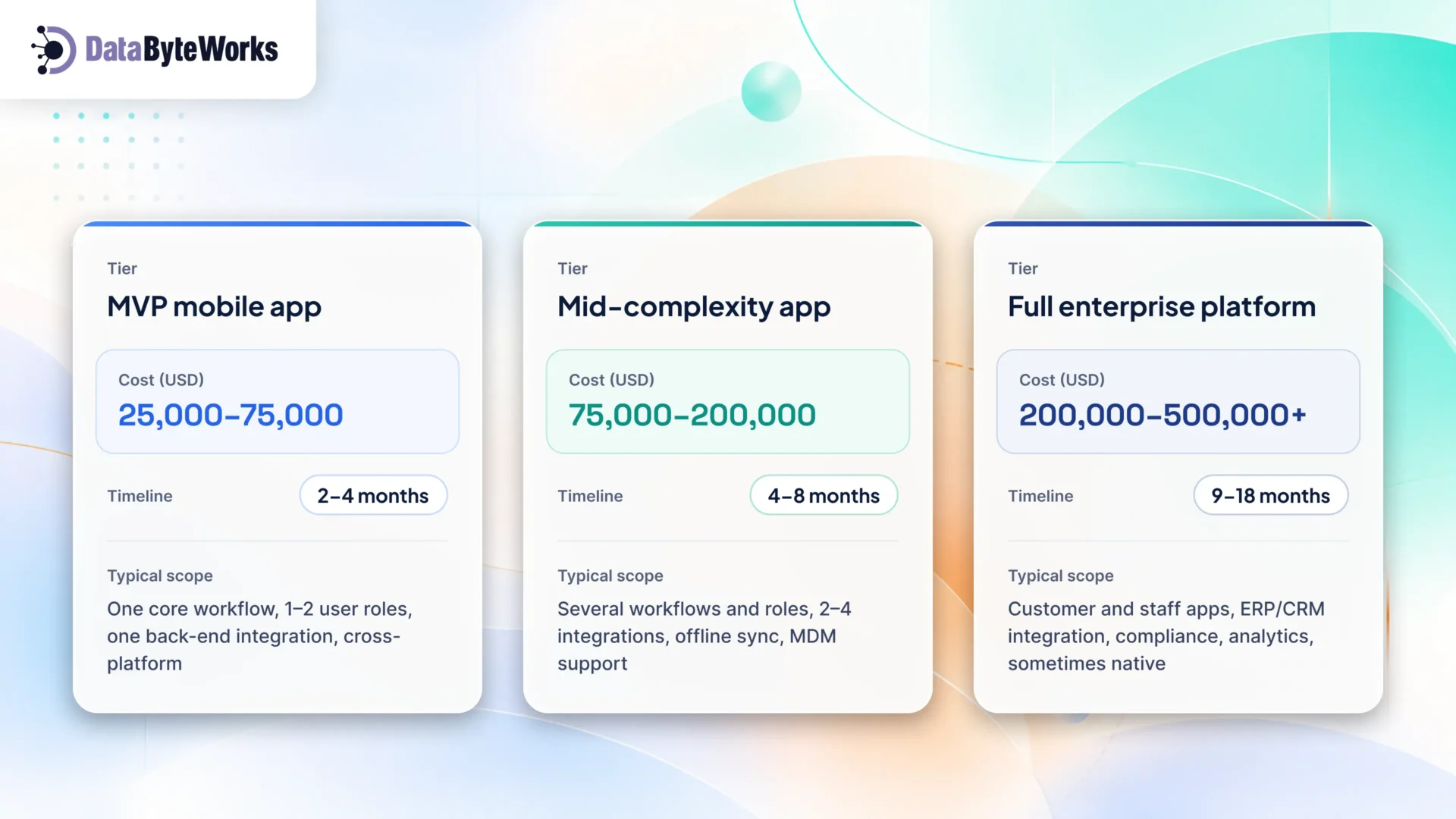
What moves a project up or down a band:
- Integrations. Each system the app reads from or writes to adds design, build, and testing work.
- Offline sync. Conflict handling and local storage add real effort.
- Compliance. HIPAA, PCI DSS, or SOC 2 requirements add security work and review.
- Native vs. cross-platform. Two native codebases cost more to build and maintain than one shared codebase.
- Design depth. A customer-facing app usually needs more design work than an internal tool.
Three more numbers to plan around:
- Team location. US in-house engineers cost about 150-250 an hour, against 55-95 for nearshore teams. That gap cuts project cost by 45–60% for the same output. Offshore dedicated teams usually sit lower still.
- Hidden costs. QA, compliance, app store resubmissions, and first-year maintenance add 40–70% to the base build for most enterprise apps (same source). Put them in the budget from the start.
- AI features. Adding an LLM-powered chat assistant or document search can cost tens of thousands of dollars, depending on data complexity, integrations, security requirements, and testing. For example, India-based estimates put RAG implementations at 15,000-50,000, while customer-facing assistants with RAG may cost 25,000-80,000.
Not Sure Whether to Build or Buy?
We’ll look at your workflows, user numbers, integrations, and device policies, then tell you plainly whether to buy, build, or start with one and move to the other. If building makes sense, we’ll recommend native or cross-platform and give you a realistic cost and timeline.
Book a free build-vs-buy assessment call with our dedicated mobile development team.