

An on-premises-to-Azure migration takes about 6 weeks for a small business and 6–18 months for a large company. A simple move costs a few thousand dollars per server. Rebuilding applications for the cloud costs much more. Most projects don’t go over budget because of the move itself. They go over because of things nobody planned for.
There’s also a deadline. Windows Server 2016 support ends on January 12, 2027. After that date, those servers stop getting free security updates.
This guide answers three questions: What will it cost? How long will it take? What usually goes wrong?
What is on-premise to Azure migration?
On-premise to Azure migration means moving your servers, apps, databases, and files from your own hardware to Microsoft’s Azure cloud.
Why US Companies are Moving Now
- Support is ending. SQL Server 2016 support ended in July 2026, and Windows Server 2016 support ends in January 2027.
- Old hardware. Many servers are due for replacement, and new hardware locks you in for another five years.
- AI and data. Tools like Microsoft Copilot and Azure AI work best when your data is already in Azure.
- Security. Customers, auditors, and insurers expect modern security controls.
Not everything has to move. Some systems can stay on-premises, such as equipment that needs very fast local connections, or software you’ll retire soon. You can still manage them from Azure with Azure Arc.
Choose your Azure migration strategy
Your Azure migration strategy has the biggest effect on cost and time. There are seven common options:
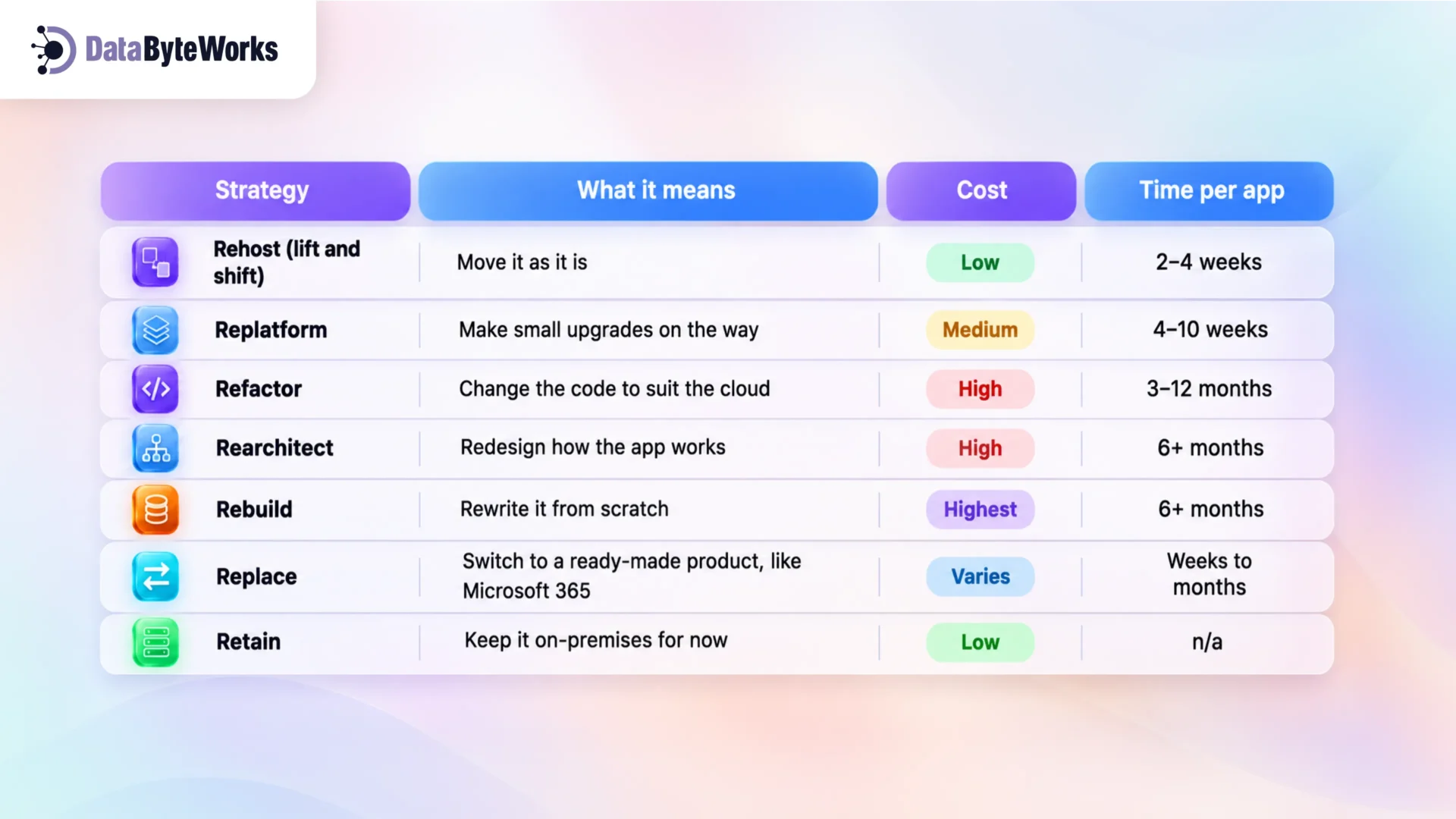
Choose for each app, not for everything. A file server and a customer-facing system have very different needs. Simple apps can usually be rehosted. Older, business-critical apps often need legacy application modernization services to get real value from the cloud.
How Much Does an Azure Migration Cost?
Azure migration cost comes in two parts. Keep them separate in your budget:
- The one-time project: planning, moving your systems, testing, and going live.
- The monthly Azure bill: what you pay every month for servers, storage, and licenses.
If you mix them up, a low project quote can hide a high monthly bill.
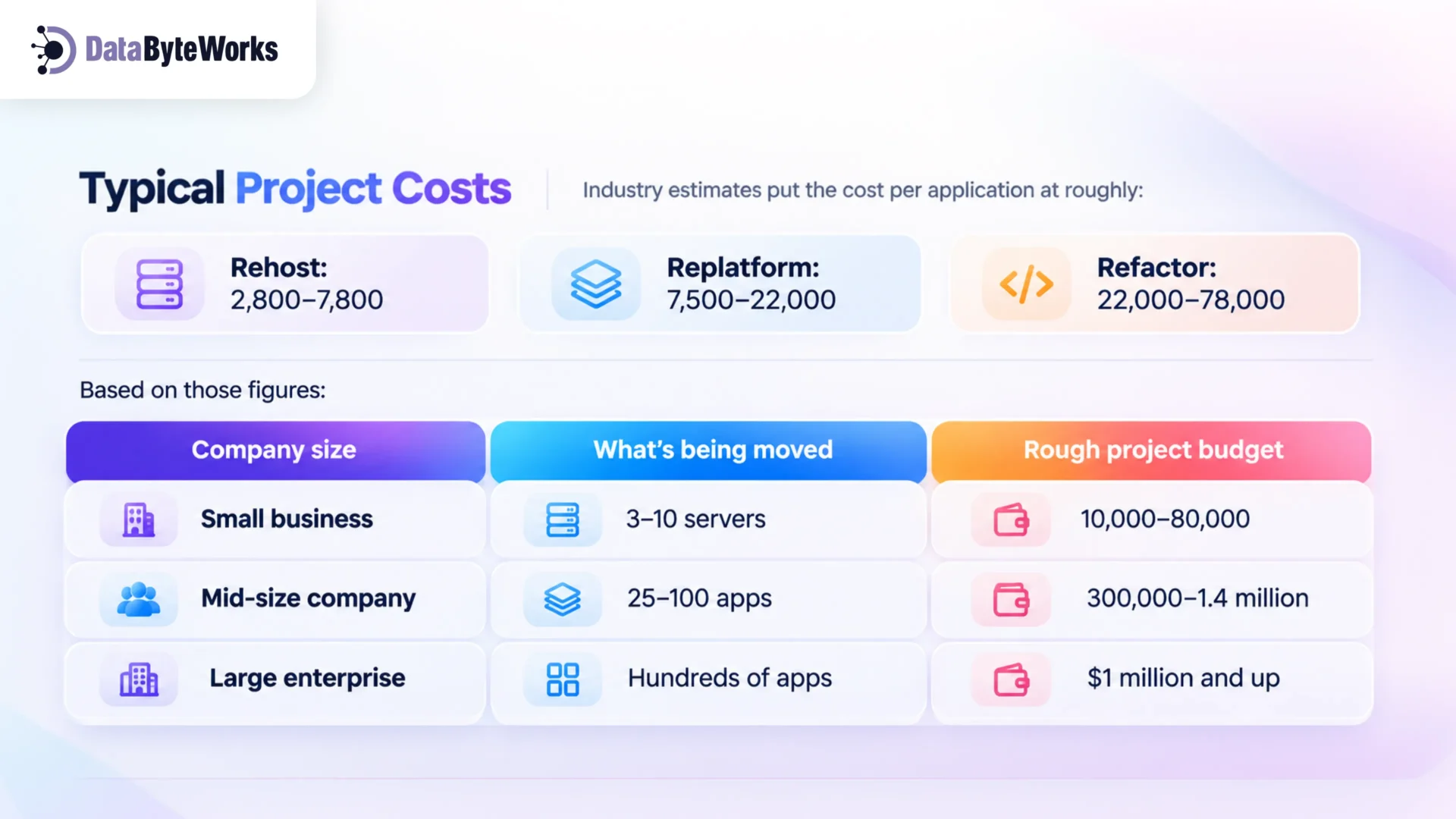
These are planning ranges, not quotes. A proper assessment gives you the real number.
Costs People Forget
- Paying twice: running your old servers and Azure at the same time.
- Oversized servers: copying old server sizes into Azure, when most servers use only part of their capacity.
- Data transfer fees: moving data out of Azure costs money.
- Training: your team needs time to learn Azure.
How to Lower the Cost
- Reuse your licenses. With Azure Hybrid Benefit, you can bring your existing Windows Server and SQL Server licenses. Microsoft says this can save up to 80% on Windows Server.
- Commit for 1–3 years on systems that run all the time, for lower rates.
- Size servers based on actual usage, not your current hardware.
- Start with the free tools. Azure Migrate’s assessment tools are free, so you can plan before you spend.
To estimate your monthly bill, try Microsoft’s Azure Pricing Calculator.
How Long Does an Azure Migration Take?
A typical Azure migration timeline depends mostly on how many systems you have:
| Company size | Typical timeline |
| Small business (3–10 servers) | 6 weeks to 3 months |
| Mid-size company (25–100 apps) | 3–9 months |
| Large enterprise | 6–18 months |
Most of that time goes into planning and setup, not the move itself:
- Assessment: 2–4 weeks
- Setting up Azure (the “landing zone”): 2–6 weeks
- Test move (pilot): 2–4 weeks
- Main moves: in planned groups, usually one or two a month
What slows projects down: systems that depend on each other in ways nobody documented, compliance reviews, a team that’s new to Azure, and systems that can’t be offline even briefly.
Step-by-Step Azure Migration Process
- Set clear goals. For example: close the server room by June, or cut IT costs by 20%.
- List everything. Use Azure Migrate to find all your servers, and track their real usage for at least 30 days.
- Find the connections. Work out which systems depend on each other, and move them together.
- Set up Azure properly. Build the network, security rules, and access controls first. This foundation is called a landing zone.
- Do a test move. Start with something useful but low-risk, such as an internal tool.
- Move in groups. Move the remaining systems in planned waves, including your databases.
- Test everything. Check that each system works, is fast enough and is secure. Have a backup plan ready.
- Go live. Switch users over at an agreed time, with the old system on standby.
- Switch off old servers last. Wait 2–4 weeks to make sure everything runs smoothly.
If you’re not sure where to start, a cloud strategy and consulting session can help you plan the first steps.
10 common Azure migration mistakes
Most Azure migration mistakes come from poor planning, not from technology.
| Mistake | What happens | How to avoid it |
| 1. No clear goals | You can’t tell if the move worked | Agree on 3–4 measurable goals before you start |
| 2. Missing dependencies | Hidden connections cause delays mid-project | Map how systems connect before moving anything |
| 3. Skipping the setup | Messy, insecure Azure that needs rebuilding later | Build the landing zone first |
| 4. No cost controls | Monthly bills creep up | Set budgets and spending alerts from day one |
| 5. Assuming security carries over | Old security settings don’t work the same way in Azure | Set up security again, designed for Azure |
| 6. Poor network planning | Slow apps for office users | Test speed and connections early |
| 7. No training | Mistakes and slow progress | Train your team, or work with Azure experts |
| 8. Moving everything as it is | High bills for old, oversized servers | Choose the right approach for each app |
| 9. No backup plan | A failed switch-over stops the business | Back up, and keep the old system ready |
| 10. Ignoring licenses | Paying again for licenses you already own | Use Azure Hybrid Benefit |
Security and Compliance
Azure secures its data centers. Securing your data, users, and access is still your job. At a minimum:
- Turn on multi-factor authentication for every user.
- Use Microsoft Defender for Cloud to spot security gaps.
- Store passwords and keys in Azure Key Vault, not in code.
- Back up your data, and test a restore before you switch off old servers.
If you work in a regulated industry, check your rules early. For example, healthcare software development teams need to plan for HIPAA from day one. Azure supports HIPAA, but your own setup still has to meet the rules.
After the Migration
Going live is where the savings start, not where the project ends.
- Watch your costs. Review your Azure bill every month, and remove or shrink anything you don’t need.
- Monitor performance. Use Azure Monitor to catch problems before users notice them.
- Improve step by step. Once things are stable, move apps to managed Azure services, such as Azure SQL or Azure App Service, to cut maintenance work.
An Example From Our Work
Since 2022, a DataByteWorks team has built and run a secure data platform on Azure for a US company in New Jersey. The platform handles large volumes of data, and our team also manages its Azure setup. In the client’s verified Clutch review, they report fewer performance problems, steady speed at busy times, and growth without having to redesign the system.
Do it Yourself or Hire a Partner?
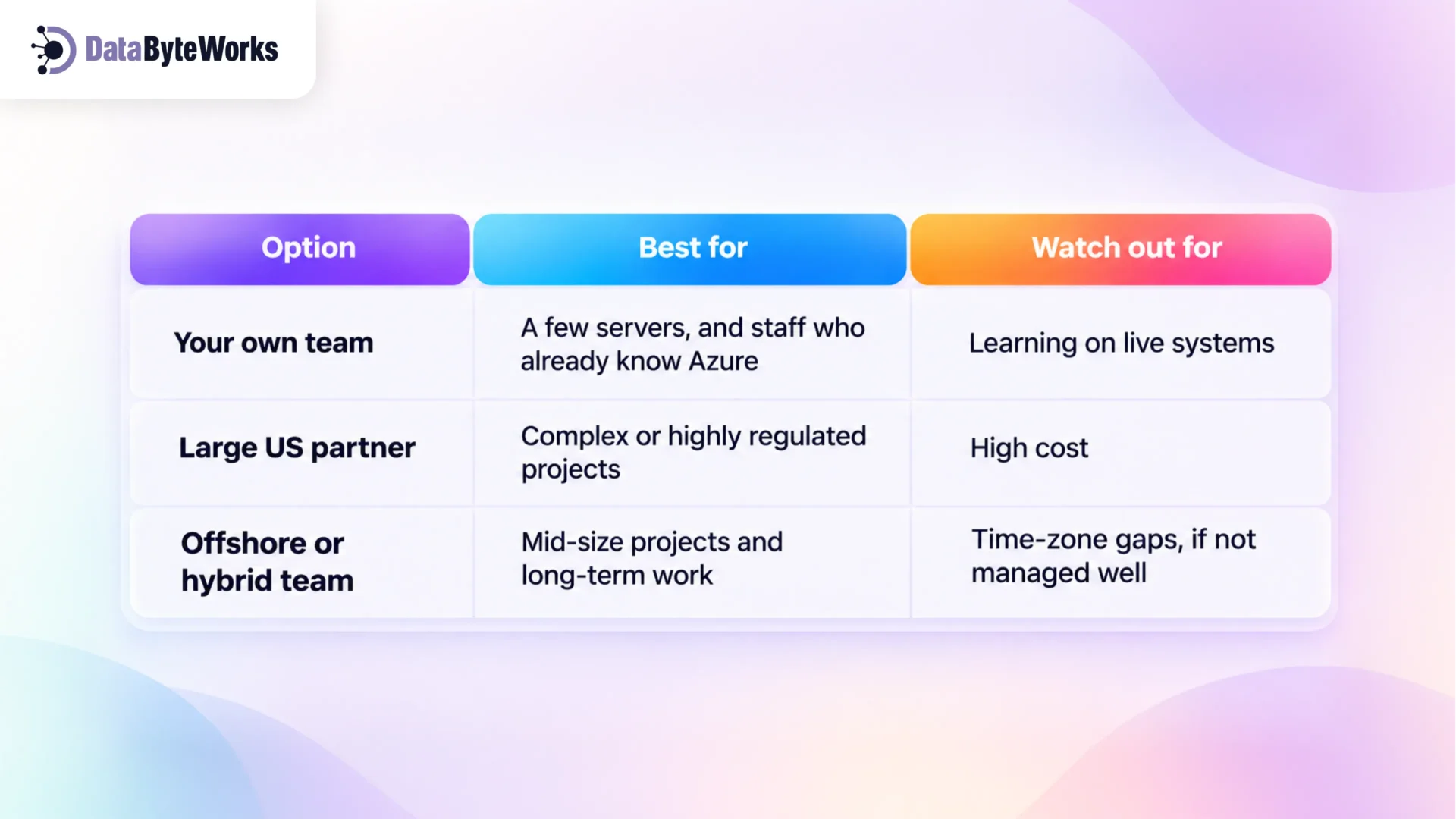
What to Look for in an Azure Migration Partner:
- Microsoft partner status and Azure-certified engineers
- A fixed-price assessment before any big commitment
- A written backup plan for every move
- Support for at least 30–90 days after go-live
- At least 3–4 working hours a day that overlap with your team
If you’d rather keep control and just add skills, you can hire Azure developers to join your team, or hire cloud developers for wider cloud and DevOps work.
Azure Migration Checklist
Use this Azure migration checklist before you move anything:
- Goals agreed and written down
- Current IT costs recorded
- One person named to make final decisions
- All servers and apps listed, including any running Windows Server 2016
- At least 30 days of usage data collected
- Connections between systems mapped
- Approach chosen for each app
- Project budget and monthly Azure budget approved
- Licenses checked for Azure Hybrid Benefit
- Azure landing zone and security set up
- Backups tested and backup plan ready
- Test move completed
Ready to Plan your Azure Migration?
A smooth on-premise to Azure migration needs three things: a clear budget, a realistic timeline, and a plan that avoids common mistakes. With Windows Server 2016 support ending on January 12, 2027, now is the right time to start.
DataByteWorks helps US companies plan and complete Azure migrations, from moving a few servers to modernizing full applications.
Book a free assessment with our cloud migration services team.