

Enterprises rarely fail at cloud migration because of the cloud. They fail because someone skipped a phase. A missed dependency, an untested database, security “for later” these are small shortcuts that turn a six-month plan into an 18-month rescue.
This cloud migration checklist prevents that. Use it as a working tool: tick every box in a step before moving to the next, and keep your enterprise cloud migration on time, on budget, and secure.
What Is Cloud Migration (and What Is Cloud Modernization)?
In this checklist, cloud migration means getting a workload running in the cloud with as few changes as possible, so you can switch off the old servers. Cloud modernization means changing how that workload is built, so it scales better and costs less over time.
Most enterprises need both, and the steps below show where each one fits. For a deeper explanation of cloud-native development, see the FAQ on our Cloud-Native Development page.
Why Enterprises Need a Cloud Migration Strategy Before They Touch a Workload
Without a written strategy, teams default to “lift and shift everything.” It feels fast. The numbers say otherwise:
- McKinsey found migration inefficiencies cost the average company 14% more than planned every year, and 38% of companies saw migrations slip by more than a quarter.
- Flexera’s 2026 State of the Cloud Report puts wasted cloud spend at 29%, and 85% of organisations call managing cloud spend a top challenge.
- Spending keeps climbing anyway. Gartner expects public cloud spending in India to grow 28.1% to $17.5 billion in 2026.
A clear strategy guards against the three big risks: cost overruns, downtime, and security gaps. That’s why many enterprises bring in cloud consulting services or cloud strategy consulting early. An outside team spots blind spots your in-house team is too close to see.
The Enterprise Cloud Migration Checklist: Step-by-Step
Seven steps across five phases: Assess covers Step 1, Plan covers Steps 2–3, Secure covers Step 4, Migrate covers Steps 5–6 (moving workloads, then modernizing the ones that need it), and Optimize covers Step 7. Tick every box in a step before you start the next.
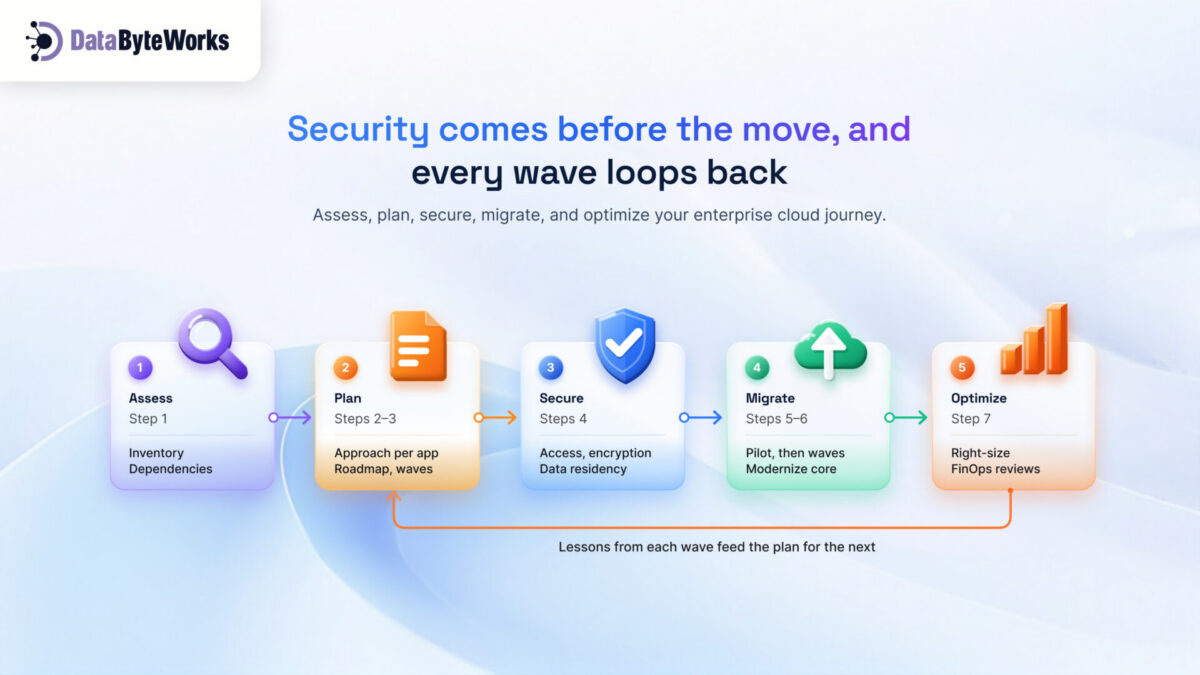
Step 1: Assess Your Current Environment
You can’t move what you can’t see. Build a full inventory first.
- List every app, database, server, and integration
- Map dependencies: which systems talk to which
- Record today’s cost and performance as your baseline
- Check which software licences you can bring to the cloud (BYOL) and which you must rebuy
Step 2: Define Your Cloud Migration Strategy and Target Architecture
Pick an approach per workload, not one for everything:
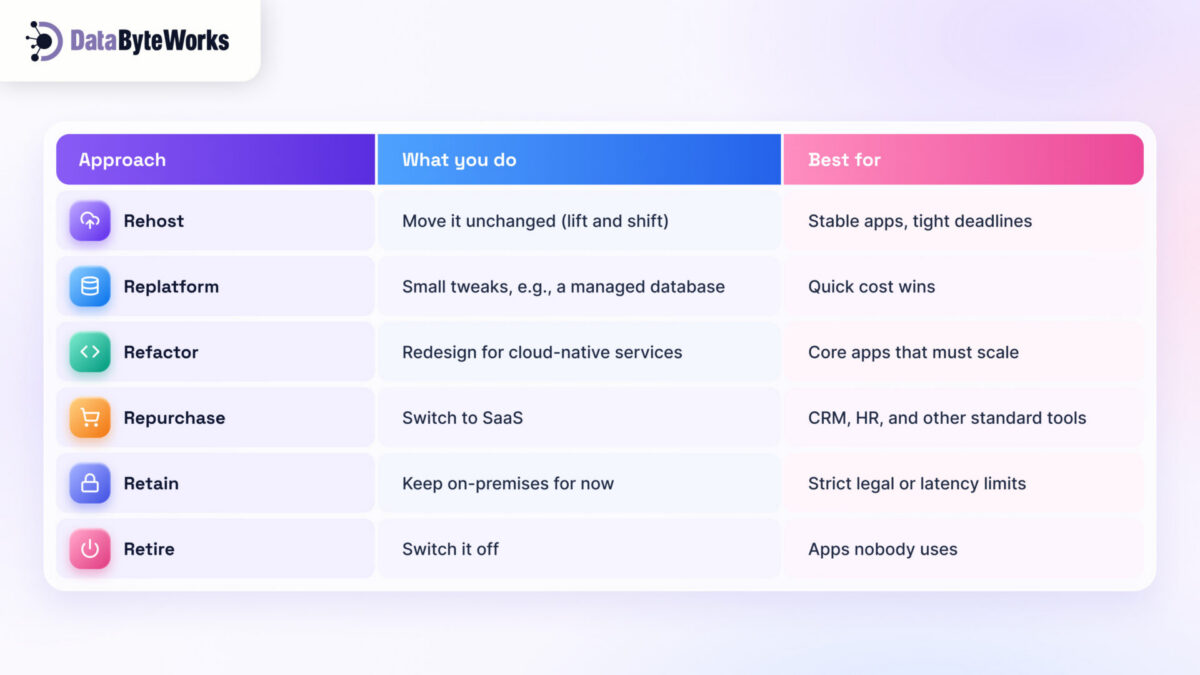
- Assign an approach to every workload
- Choose your provider(s), design network, identity, and backup
- Set success metrics: cost, uptime, performance, dates
- Write an exit plan: how you’d move a workload out if prices or needs change
Step 3: Build a Migration Roadmap and Sequencing Plan
Move low-risk workloads first, learn, then tackle the critical ones.
- Score workloads by business risk and complexity
- Group dependent systems into “move groups”
- Assign an owner, date, and rollback plan to each wave
- Train your ops team on the new platform before wave one, not after
Step 4: Plan for Cloud Application Security From Day One
Build cloud application security into the design so every workload lands somewhere safe.
- Set up least-privilege access and multi-factor login
- Encrypt data at rest and in transit
- Turn on logging and threat alerts before go-live
- Confirm data residency: India’s DPDP Act and RBI rules can decide which cloud region you must use
Step 5: Migrate Workloads in Phases
Now run the cloud migration steps: pilot first, then scale wave by wave.
- Migrate one low-risk pilot end-to-end
- Test function, speed, and security against your baseline
- Validate data: match row counts, checksums, and a sample of real records
- Update the runbook, then move the next wave
Step 6: Modernize Where It Makes Sense
Lift and shift gets you to the cloud. Cloud native application development gets you the full benefit.
- Pick workloads where scale or speed justifies a redesign
- Use containers, managed databases, and serverless where they fit
- Automate testing and deployment with CI/CD
- Make your data AI-ready: clean, labelled, and in one governed place
Step 7: Validate, Optimize, and Monitor
Cutover isn’t the finish line. The first 90 days decide whether you actually save money.
- Compare cost and performance with your Step 1 baseline
- Right-size servers and switch off idle resources
- Set cost alerts and a monthly FinOps review
- Decommission old hardware and cancel unused licences
The Cutover Day Playbook
Most guides stop at “migrate.” But cutover day is where things go wrong in public. Agree on this plan, and your rollback triggers, before the day arrives.
| When | What happens | Owner |
| 7 days before | Final rehearsal; freeze changes; confirm rollback works | Migration lead |
| 1 day before | Go/no-go meeting against agreed criteria; notify users | Business + IT |
| Hour 0 | Final data sync; switch DNS and traffic to the cloud | Engineering |
| First hour | Smoke tests on key journeys: login, payments, reports | QA |
| First 24 hours | Watch errors and latency; roll back if errors pass your agreed limit | On-call team |
| First week | Keep the old system on standby; then switch it off | Migration lead |
Cloud Migration vs. Cloud Modernization: Which Workloads Need Which
Not every workload deserves a rebuild. Match each one to the right path:
| Workload type | Migrate as-is | Modernize | Rebuild cloud-native |
| Stable back-office apps | ✓ Best fit | If costs run high | — |
| Databases and file storage | Short term | ✓ Managed services | — |
| Customer-facing web and mobile apps | First step only | ✓ Good fit | ✓ If traffic is spiky |
| Core revenue platforms | — | Possible | ✓ Best long-term value |
| New AI and data products | — | — | ✓ From day one |
The rule of thumb: migrate what’s stable, modernize what’s growing, rebuild what earns revenue. Cloud modernization services pay off fastest on the apps your customers use every day.
Common Cloud Migration Mistakes That Cost Enterprises the Most
1. Migrating Without a Security Plan
Teams copy old firewall rules and admin accounts straight into the cloud. Attackers love that. Design identity, encryption, and monitoring for the cloud before the first workload lands.
2. Treating Migration as a One-Time Project
Cloud prices, services, and usage change every month. Without an owner for ongoing reviews, your savings quietly disappear.
3. Skipping Cost Modeling Before Migration
A server that runs 24/7 can cost more in the cloud than on-premises. Model each workload’s monthly bill first, then right-size and choose the right pricing plan.
4. Locking In With No Way Out
Heavy use of one provider’s proprietary services makes leaving expensive. Keep an exit plan and use open standards, like containers, where portability matters.
How DataByteWorks Supports Enterprise Cloud Migration
Most enterprises juggle separate vendors to migrate, modernize, and secure. The handoffs cause the delays. DataByteWorks runs all three as one engagement:
- Cloud migration consulting: assessment, strategy, and sequencing
- Cloud migration services: wave-by-wave execution with testing and rollback
- Cloud modernization and cloud-native software development on Azure and other leading platforms
- Application security services built into the design and kept running after go-live
As a cloud consulting company, we stay after cutover to tune performance and keep your cloud bill in check.