
SaaS has become the default choice for 99% of modern organizations, but that doesn’t mean it fits every workflow. As companies grow, subscription costs, fragmented tools, limited customization, and integration gaps can make off-the-shelf software harder to manage.
So, which option makes more sense: custom software vs SaaS?
The answer depends on your business model, budget, workflows, scalability goals, and need for control. This software decision guide compares SaaS and custom software development across cost, flexibility, integration, ROI, and long-term value to help you make a smarter build-vs-buy software decision.
What is SaaS?
SaaS (Software as a Service) is cloud-based software that businesses access through monthly or annual subscriptions. Common examples include CRM, accounting, HR, collaboration, project management, and marketing platforms.
SaaS tools for business are useful when companies need proven functionality without building and maintaining their own software infrastructure.
Key Benefits of SaaS:
- Quick setup and deployment
- Low upfront investment
- Vendor-managed hosting and maintenance
- Regular updates and improvements
- Predictable access to standard features
What is Custom Software?
Custom software is designed around a company’s specific workflows, requirements, and business objectives. It can be developed from scratch or built by extending existing technologies.
Unlike SaaS, custom software gives businesses greater control over functionality, integrations, data architecture, and future enhancements. It is particularly valuable when standard products cannot accommodate complex or differentiated processes.
Key Custom Software Benefits:
- Fully customized functionality
- Greater scalability
- More control over data and technology
- Deeper integration with internal systems
- Flexibility to evolve with business requirements
The Real Difference: Cost Over Time
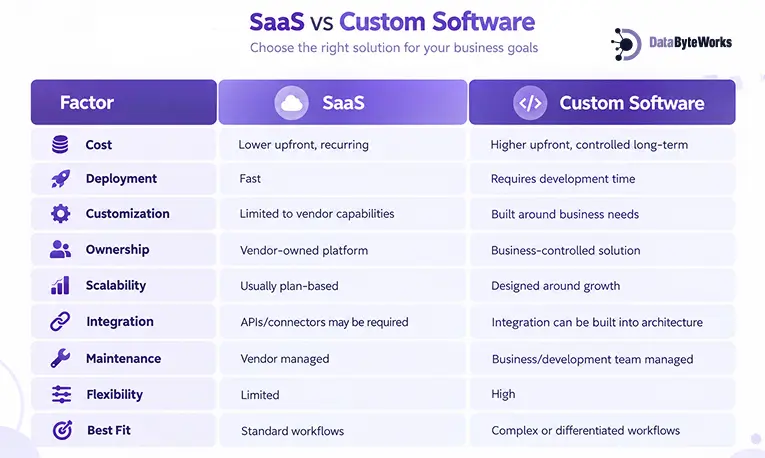
The initial SaaS subscription can appear cheaper than custom software development. However, looking only at the entry price can create an incomplete picture.
SaaS costs can grow significantly as organizations add users and applications. Spendesk, citing Redline research, reports that SMEs spent approximately $11,200 per employee on SaaS in 2023. Meanwhile, Zylo’s 2026 SaaS Management Index found an average 36% unutilized software rate, highlighting the cost of unused licenses.
For a growing organization, costs can increase through additional users, premium plans, integrations, storage, automation, and multiple subscriptions.
Custom software requires a larger initial investment, but recurring licensing costs may be lower for a system that becomes central to business operations.
The key question is not simply, “Which costs less?” It is, “Which option delivers more value relative to its total cost over time?”
Market Trends: What Businesses Are Choosing
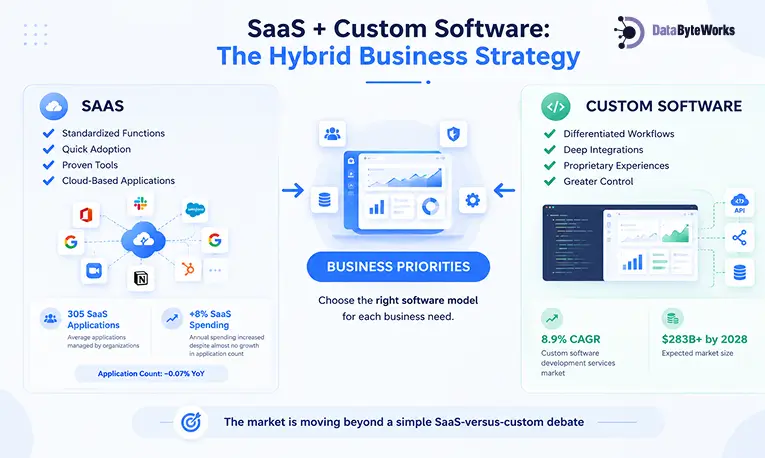
The market is moving beyond a simple SaaS-versus-custom debate. Businesses increasingly combine different software models based on their operational priorities.
Zylo’s 2026 SaaS Management Index reports that organizations manage an average of 305 SaaS applications and spend about $55.7 million annually on SaaS. Yet application counts declined just 0.07% year over year while spending increased 8%, showing that SaaS costs can rise even without significant portfolio growth.
This growth creates both convenience and complexity.
SaaS remains attractive for standardized functions because companies can adopt proven tools quickly. Custom software becomes more relevant when businesses need differentiated workflows, deeper integrations, proprietary experiences, or greater control.
Gartner reports that the custom software development services market is growing at an 8.9% CAGR and is expected to exceed $283 billion by 2028, reflecting growing demand for software tailored to specific business requirements.
When is SaaS the Right Choice?
SaaS advantages appear best when your requirements are standardized, time-sensitive, and budget-conscious. It allows businesses to adopt established capabilities without managing the entire technology lifecycle.
Choose SaaS if:
- You are a startup or small business
- You need rapid deployment
- Your workflows are relatively standard
- Your upfront budget is limited
- You prefer vendor-managed infrastructure
- You need commonly available functions such as CRM, HR, accounting, or collaboration
For Example: A small consulting firm can use SaaS for CRM, accounting, payroll, project management, and communication without building separate internal systems.
When Custom Software is the Better Option?
Custom software benefits businesses when technology needs to reflect how they actually operate, rather than forcing employees to adapt to generic workflows.
Consider custom development if:
- Your workflows are unique
- You require deep system integration
- Your business is scaling rapidly
- Existing SaaS tools create process bottlenecks
- You need greater control over data and functionality
- Your software itself can create competitive differentiation
For example: A logistics company managing complex routing, fleet operations, warehouse processes, customer portals, and real-time tracking may benefit from one connected platform instead of several disconnected SaaS tools.
Hidden Costs Most Businesses Miss
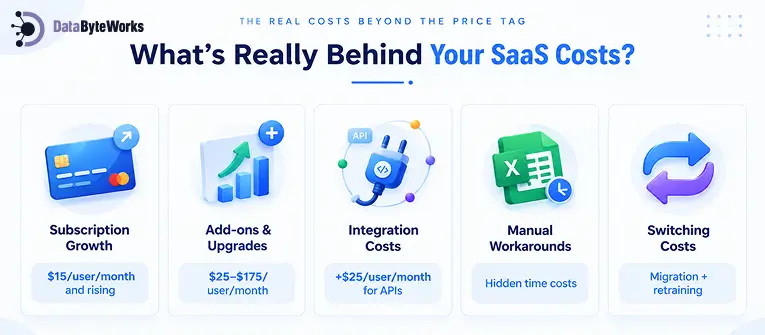
SaaS pricing may look straightforward, but total costs can rise as requirements evolve.
1. Subscription Growth
Per-user pricing increases as teams expand. Premium plans may also be necessary when businesses need advanced security, analytics, automation, or administration features.
2. Add-ons & Upgrades
Important capabilities may sit behind higher pricing tiers or separate modules. Businesses should calculate the cost of the features they actually need rather than comparing entry-level plans.
3. Integration Costs
Connecting multiple SaaS platforms may require APIs, middleware, integration platforms, or developer resources. Integration work becomes particularly important when data needs to move across CRM, ERP, finance, HR, and operational systems.
4. Manual Workarounds
When software does not match a workflow, employees may rely on spreadsheets, duplicate data entry, emails, or manual approvals. These hidden productivity costs rarely appear on the software invoice.
5. Switching Costs
Moving between SaaS platforms can involve data migration, reconfiguration, training, integration changes, and process redesign.
The Takeaway: SaaS is not automatically expensive, and custom software is not automatically cheaper. A meaningful SaaS vs custom ROI analysis should consider the complete cost of ownership.
Total Cost of Ownership (TCO): What Should You Compare?
A practical SaaS vs custom software comparison should evaluate costs over a three-to-five-year period, not just year-one spending.
| TCO Factor | SaaS | Custom Software |
| Initial investment | Low | High |
| Subscription/license fees | Recurring | Usually lower after development |
| User-based costs | Can increase | Generally controlled |
| Customization | Additional cost or unavailable | Included in development scope |
| Integration | Additional APIs/tools may be required | Designed into solution |
| Maintenance | Included or vendor-managed | Ongoing development/support |
| Migration | Potential future cost | Usually lower once owned |
| Long-term control | Vendor dependent | Business controlled |
The best decision regarding choosing comes from calculating three-to-five-year TCO, expected productivity gains, integration expenses, maintenance requirements, and business value.
The Hybrid Approach: Best of Both Worlds
You don’t need to choose SaaS or custom software for every business function. A hybrid model combines both approaches based on what each does best.
Use SaaS for standardized functions such as HR, payroll, accounting, collaboration, and basic CRM. Build custom software for areas that directly support competitive advantage, including unique workflows, customer portals, proprietary platforms, AI-powered features, and specialized automation.
For example, an eCommerce company can use SaaS for accounting and HR while developing a custom order management platform and personalized customer experience.
This Approach Works Due to:
- Faster Execution: SaaS handles standard requirements without lengthy development cycles.
- Lower Initial Investment: Businesses avoid building systems where customization adds little value.
- Long-Term Scalability: Custom systems can evolve around critical business processes.
The goal is simple: Use SaaS where standardization works and custom software where differentiation matters.
Migration Guide – Moving from SaaS to Custom Software
Outgrowing SaaS does not mean replacing everything at once. A structured migration reduces disruption and helps protect existing data and workflows.
1. Identify the Limitations
Document where the current SaaS platform creates bottlenecks, manual work, integration issues, or scalability constraints.
2. Calculate the Business Case
Compare current subscription, integration, support, and productivity costs with projected custom development and maintenance costs.
3. Prioritize Critical Workflows
Do not recreate every SaaS feature. Start with processes that generate the greatest operational or strategic value.
4. Plan Data Migration
Define which records need to move, clean duplicate or outdated data, establish mapping rules, and validate migration procedures before launch.
5. Build in Phases
Start with an MVP or high-value module. Integrate it with existing systems, then gradually replace dependent SaaS functions.
6. Train and Measure
Prepare users for workflow changes and track adoption, productivity, system performance, cost savings, and business outcomes after deployment.
This approach turns migration into a controlled modernization project rather than a disruptive software replacement.
Final Verdict: Which Is Better?
There is no universal winner in the custom software vs SaaS debate.
SaaS is generally the stronger option for business software solutions when speed, simplicity, predictable functionality, and low upfront investment matter most. Custom software becomes more attractive when your workflows are unique, your integrations are complex, or technology itself is becoming a source of competitive advantage.
For many businesses, the smartest answer is a hybrid approach. Use SaaS for standardized operations and custom development for the processes that differentiate your company.
Ultimately, your build vs buy software decision should consider TCO, scalability, integration requirements, flexibility, security, ownership, and long-term business value, not just the initial price.
How DataByteWorks Can Help
Choosing between SaaS and custom development requires a clear view of your existing technology stack, business workflows, integration requirements, and growth plans.
DataByteWorks helps businesses evaluate these factors and identify where SaaS, custom development, or a hybrid architecture makes the most sense.
Our approach can help you:
- Assess existing systems for technology gaps and inefficiencies.
- Compare SaaS, custom, and hybrid options using TCO and business priorities.
- Integrate existing platforms through APIs instead of replacing systems unnecessarily.
- Modernize critical workflows where off-the-shelf tools create limitations.
- Build scalable solutions around complex or differentiated business requirements.
The objective is straightforward: use existing technology where it creates value and invest in custom software development where greater control and flexibility can improve business performance.
Your Business Deserves Better Than “Good Enough.”
Skip the endless software comparisons. DataByteWorks helps you find the right technology for your workflows, budget, and ambitions. So, every software decision moves your business forward.